R99
3
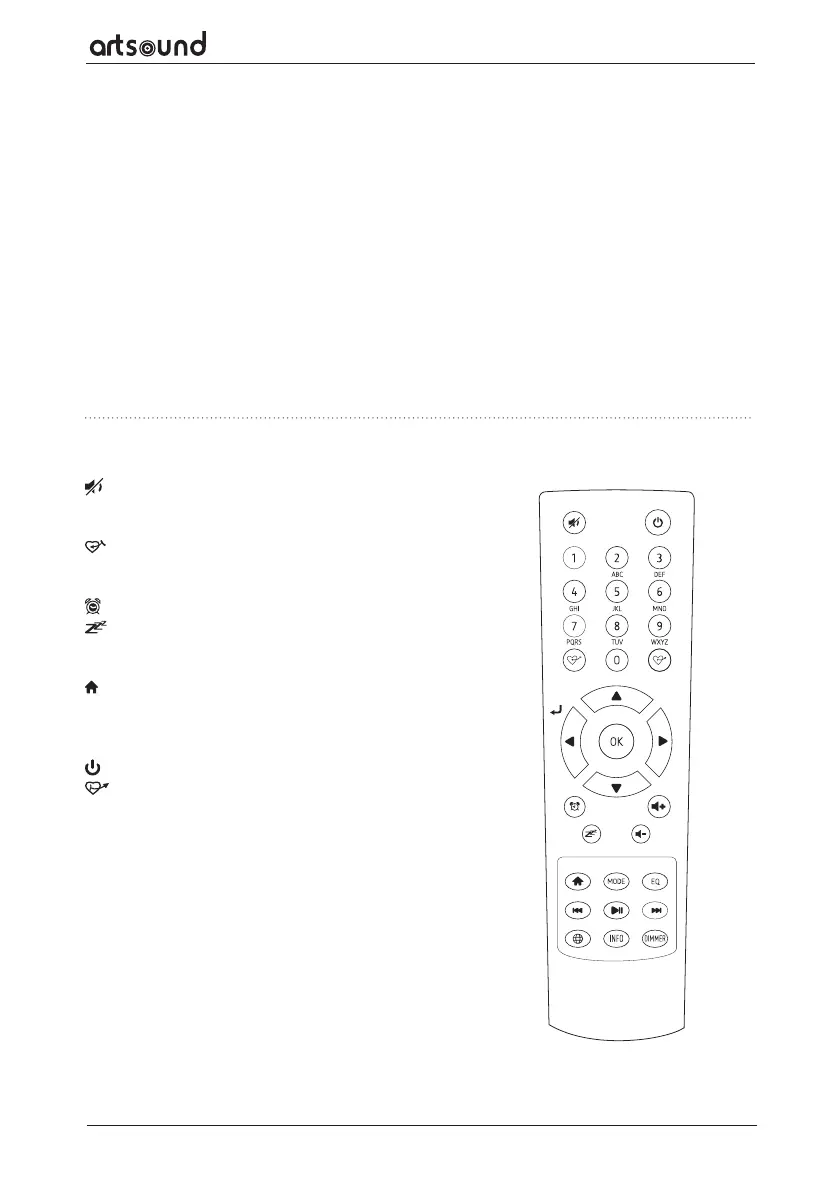
4. REMOTE CONTROL
Mute
0-9 Input index number on the list / input characters for
WiFi password
Preset the current playing station to Favorite
▲ Cursor up
⊳ Cursor left / back to previous menu
Alarm button
Sleep Timer
Mode Switch between Internet radio/DAB/FM/Bluetooth/
Media Centre
Main Menu
Previous station on the list/previous track on blue-
tooth/Media Centre
w Access network info of the radio unit
Press to toggle between Standby and Operation
Recall the favorite list
OK confirm button
⊲ Cursor right
▼ Cursor down
Vol+ Volume up
Vol- Volume down
EQ Equalizer
Next station on the list/next track on bluetooth/Media
Centre
Play/pause for Bluetooth/Media Centre Play/stop for
Internet radio
Dimmer Access the Dimmer menu to adjust the brightness
of the display
Info Toggle to cycle through the station's info, the big
clock display or return to now playing screen
12. USB Playback
Play audios from USB thumb drive
13. Headphone jack
3.5 mm Headphone output with volume controlled
by dial (for the line output volume control, please
refer to the Line/Digital out setting on P.15)
14. Power On/O switch
15. DC-IN Jack
16. Ethernet (LAN) connector
17. WiFi antenna connector
Connect the WiFi antenna before setting up the
Tuner
18. DAB/FM antenna
19. Digital out – Optical
20. Digital out - Co-axial
21. Line out - L
22. Line out - R
23. BT Antenna connector
Connect the Bluetooth antenna before pairing
with your bluetooth


 To Next Page
 Loading...