
 Need help?
Do you have a question about the AS TFmini Plus and is the answer not in the manual?
Lists the necessary hardware for testing and modifying the TFmini Plus.
Outlines the steps for connecting and preparing the TFmini Plus for testing.
Command to turn off input/output to prevent conflicts during configuration.
Configures switch value mode, critical value, and hysteresis for output. Includes examples.
Command to enable output and start measurements after configuration.
Command to reset the device to its original factory configuration.
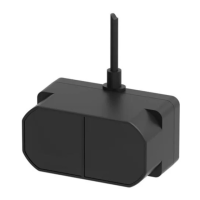
The TFmini Plus is a device designed to provide a switch value signal output, which can be configured for various detection scenarios. This manual serves as a guide for modifying the TFmini Plus to achieve this specific output, where the switch value represents an active signal (step signal) of either 0V or 3.3V.
The core function of the TFmini Plus, when configured for switch value output, is to detect objects within a specified range and output a corresponding high (3.3V) or low (0V) level signal. This makes it suitable for applications requiring simple presence detection or threshold-based triggering.
The device operates based on a configurable detection threshold. For instance, if the threshold is set to 2 meters, the TFmini Plus will output a high level (3.3V) when an object is detected within 2 meters, and a low level (0V) when no object is detected within that range, or when an object is beyond 2 meters. The output level is relative to GND, emphasizing the importance of a common ground connection for accurate measurements.
The switch value output is provided by the transmit line (TXD) of the TFmini Plus, forming a reference voltage with GND. This setup allows for straightforward integration into systems that require a simple binary input based on distance detection.
The TFmini Plus offers flexibility in its switch value mode, allowing users to define how the output level responds to the detected distance relative to the threshold. There are three main switch value modes:
Beyond the switch value mode, users can also configure a "critical value" and a "hysteretic range." The critical value defines the primary threshold for switching between high and low levels. The hysteretic range introduces a buffer around the critical value to prevent rapid, unstable switching when the detected distance hovers near the threshold. For example, if the critical value is 100 cm and the hysteretic range is 2 cm, the output state will not change within the 100-102 cm range. If the original state was "close-distance," the output would only change to "long-distance" when the measurement exceeds 102 cm. If the original state was "long-distance," it would only change to "close-distance" when the measurement falls below 100 cm. This hysteresis ensures stable operation in dynamic environments.
The TFmini Plus is designed for ease of modification and configuration through serial commands, making it adaptable to various application requirements.
Connectivity: The device features four connection lines:
The TFmini Plus comes with a 30cm long connecting wire terminated with a GH1.25-4P (Molex51021-0400) connector. While this wire can be extended, it is recommended to keep the total length under 1m to ensure effective data transmission.
Configuration Process: To modify the switch value threshold and other parameters, users will need a few tools:
The configuration process involves connecting the TFmini Plus to a computer via a TTL-USB board and USB cable, ensuring a secure connection. Once connected, the serial assistant software is used to send commands to the device.
Command-Based Configuration: The modification of the switch value threshold and other settings is achieved through specific serial commands. The general steps are:
5A 05 07 00) to turn off the input and output enable of the TFmini Plus. This stops the measurement program and prevents conflicts during configuration changes.5A 09 3B EE FF GG HH KK 00 is used, where EE, FF GG, and HH KK are placeholders for the switch value mode, critical value, and hysteretic range, respectively.
EE determines the switch value mode (00 for close, 01 for near-high-far-low, 02 for near-low-far-high).FF GG represents the critical value in centimeters, with FF being the low 8 bits and GG the high 8 bits of the hexadecimal representation. For example, 500 cm (01F4 HEX) would be F4 01.HH KK represents the hysteretic range in centimeters, with HH being the low 8 bits and KK the high 8 bits of the hexadecimal representation. For example, 10 cm (000A HEX) would be 0A 00.
Several examples are provided in the manual to illustrate how to construct these commands for different thresholds and hysteresis ranges (e.g., 100cm threshold with 2cm hysteresis, 300cm threshold with 5cm hysteresis, 350cm threshold with 5cm hysteresis, and 400cm threshold with 10cm hysteresis).5A 05 07 01 00) is sent to re-enable the output and start the measurement program with the new settings.The TFmini Plus includes a feature to restore factory settings, which can be useful for troubleshooting or resetting the device to its default state.
Restore Factory Settings:
If necessary, users can send a command (e.g., 5A 04 10 00) to restore the TFmini Plus to its original factory settings. This can help resolve configuration issues or prepare the device for a new application from a clean slate.
The overall design emphasizes a user-friendly approach to configuration through a serial interface, allowing for precise control over the device's detection behavior. The clear definition of connection lines and the step-by-step guide for command-based modification contribute to its maintainability and adaptability in various projects.
 General
| Distance Resolution | 1 cm |
|---|---|
| Enclosure Rating | IP65 |
| Measurement Range | 0.1m - 12m |
| Frame Rate | 1 to 100 Hz |
| Operating Voltage | 5 V |
| Power Consumption | 0.5W (typical) |
| Communication Interface | UART |
| Operating Temperature | -10 to 60 °C |
| Storage Temperature | -20 to 70 °C |
| Ambient Light Immunity | 100K Lux |
| Current Consumption | 100mA (typical) |

 To Next Page