3
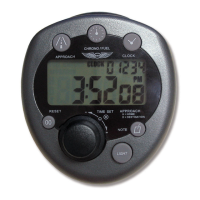
Controls and Indicators
LCD Display Icons
1 Mode indicators
2 Home/Destination approach time memory banks
3 Low battery indicator
4 5-digit note scratchpad
5 Clock and timer display
Buttons
6 CLOCK
7START/STOP
8 FUEL/CHRONO
9 APPROACH
10 RESET
11 DIAL
12 BACKLIGHT SWITCH
13 NOTE
Parts and Assembly
14 2 AAA Alkaline batteries
15 Mounting clip
16 Battery cover
17 Hook & loop mounting pad (optional)
18 Metric clip screw (M4 x 0.8mm)
Getting Started
To begin using your Flight Timer, turn the timer
over and remove the battery tab. The timer should
begin functioning.


 To Next Page