Module Connectors
INSTALLATION GUIDE
Customizable Button Module (NUDM3–HE)
4 Module Connectors
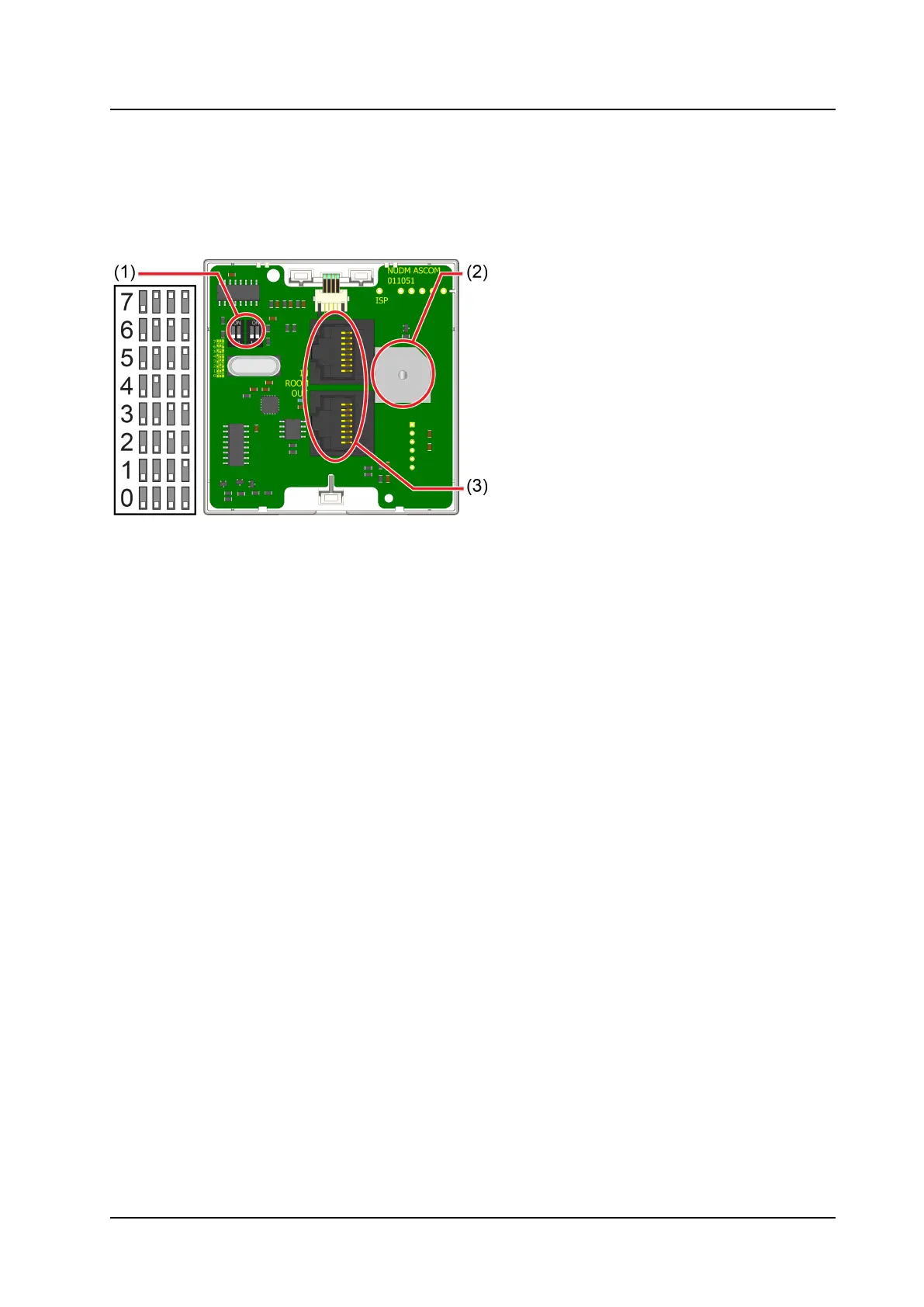
The module includes two RJ45 jacks for room bus connections, a buzzer, and DIP switches for room bus
addressing.
Figure 1. Module Connections
Legend
1. DIP switches for room bus addressing
2. Buzzer
3. 2 x RJ45 connections to room bus
4.1 Setting the Room Bus Address
The room bus address is a unique number assigned to a room module when modules of the same type are
attached to the room bus.
If you do not use DIP switches to set the room bus address, be sure all the DIP switches are in the OFF
position on the back of the module.
To set the DIP switches:
1. Set the DIP switches for the correct room bus address.
2. Using a small screwdriver, gently slide the switch up for “ON” or slide it down for “OFF”.
5 TD 93506EN / 02 March 2022 / Ver. A



 To Next Page