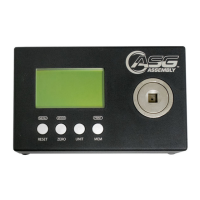
The ASG DTT Torque Meter is a portable electronic instrument designed for convenient and accurate torque measurement, primarily used for setting the torque level of fastening tools to ensure consistent fastening torque and prevent fastener breakage or loosening.
Function Description:
The DTT Torque Meter measures torque applied by various fastening tools. It can be used with hand torque screwdrivers, electric torque screwdrivers, and pneumatic screwdrivers. The device displays torque readings, measurement mode, units, current time, and the direction of applied torque (clockwise/counterclockwise). It supports data storage for up to 200 readings and offers printing and real-time data output capabilities. The meter comes with factory default settings for immediate use, but its features can be programmed and saved as system defaults.
Important Technical Specifications:
- Models: DTT-5, DTT-10, DTT-30*, DTT-50*, DTT-100, DTT-200, DTT-500 (*Special order items)
- Physical Size: 7-1/8" x 4-3/8" x 2" (110x181x50 mm.)
- Weight: 4 LB (1.8 kgs.)
- Display: Graphics LCD display, 128 x 64 dots
- Battery: NiMH 7.2V rechargeable, providing 12 hours of operation
- Battery Charger: 110-120 VAC 60 Hz 12W input, 12 VDC 500mA output (Optional 220-240 VAC input available)
- ADC: 24 bits
- CPU: 8 bits
- Communication: RS232C
- Key Buttons: 4 buttons (MENU/RESET/ESCAPE, MODE, UNIT, MEM)
- Units of Measure: 9 user-selectable torque units (Kgf-cm, gf-cm, Kgf-m, mN-m, cN-m, N-m, ozf-in, lbf-in, lbf-ft)
- Modes of Measure: 3 modes (TRACK, PEAK, FIRST PEAK)
- Display Digits: 6 digits maximum
- Special Functions: Auto Reset, Auto Memory, Auto Zero, Go - No Go, Auto Print, Real Time Clock
- Memory: Stores 200 readings with an alarm when full
- Accuracy: Better than +/- 2% of full scale (e.g., +/- 0.2 lbf.in for DTT-100)
- Overload Capacity: 200% of maximum load capacity. An "OVERLOAD" warning will flash, and the unit will lock until reset if exceeded.
Usage Features:
- Initial Setup: Before first use, charge the battery for at least 4 hours. The unit defaults to lbf.in upon power-on.
- Placement: Place the unit on a smooth, flat, level surface. For higher torques, use the optional calibration/mounting bracket.
- Unit Selection: Use the "UNIT" button to scroll through and select the desired torque units.
- Mode Selection: Use the "MODE" button to switch between TRACK, PEAK, and FIRST PEAK modes.
- Reset: The "RESET/ESC" button resets torque readings to zero. In TRACK mode, it also accesses the MAIN MENU.
- Memory: The "MEM" button saves the current torque reading into the device's memory.
- Manual Torque Drivers:
- Attach a proper adapter (not power tool adapters) to connect the driver to the 3/8" female square socket.
- Select FIRST PEAK mode.
- Turn the driver clockwise or counterclockwise until the "break" point is reached.
- The reading is displayed and can be saved to memory.
- Adjust the tool if needed and repeat the test for stable readings.
- Power Screwdrivers:
- Insert a driver adapter (joint simulator) into the unit's 3/8" square socket.
- Run the tool in reverse to unwind the adapter, then run it forward until it shuts off.
- The displayed reading is the tool's clutch torque setting.
- Save the reading to memory.
- Adjust the clutch if needed and repeat tests for stable readings.
- Important: Always unwind the driver adapter after each test and do not leave the spring under tension when not in use.
- Driver Adapters: Use an adapter with a higher capacity than the tool. Ensure the thread is unwound but engaged and turns smoothly. Refer to diagrams for proper assembly and spring identification.
- Charging: The supplied charger is for battery charging only and should not be used as an AC adapter to power the unit during normal operation. If the battery overheats, a thermal fuse will open; allow 30 minutes for it to reset.
- Calibration: ASG recommends annual calibration by qualified personnel. Calibration or calibration checks must be performed on battery power, not while the charger is attached. Use the optional calibration/mounting bracket, wheel, arm, and weights.
- Data Output: Supports printing to a serial printer via RS-232 or USB to Serial bridge cable. Also outputs real-time data to a collection program.
Maintenance Features:
- Driver Adapter Maintenance:
- Lubricate the driver shaft, bearing set, and driver shaft base with molybdenum grease as needed.
- Inspect threads on the driver shaft and base periodically for smooth turning; replace if wear is observed after 2500 cycles.
- Clean, inspect, and lubricate the bearing set after 2500 cycles; replace if not turning smoothly.
- Replace the spring after 100,000 cycles.
- If the adapter disassembles, refer to the diagram for re-assembly.
- Never leave the spring compressed after use.
- Warranty: ASG warrants the DTT meter for 1 year to the original purchaser. Defective items will be replaced or the price repaid. The warranty does not cover units subjected to overload or harsh conditions (e.g., use with impact tools).
- General Care: Treat the DTT meter as a sensitive electronic instrument. Avoid dropping the unit or items on it, and avoid high shock loads to the transducer. Use the proper driver adapter with clutch-type power tools.
- Password Protection: The Programming and Calibration Manual contains the password to enter the calibration menu. It is recommended to store this manual separately to prevent tampering. The default password can be changed, but if lost, the meter must be returned to ASG to restore it.

 Need help?
 General

 To Next Page