EN 8
YOUR OVEN
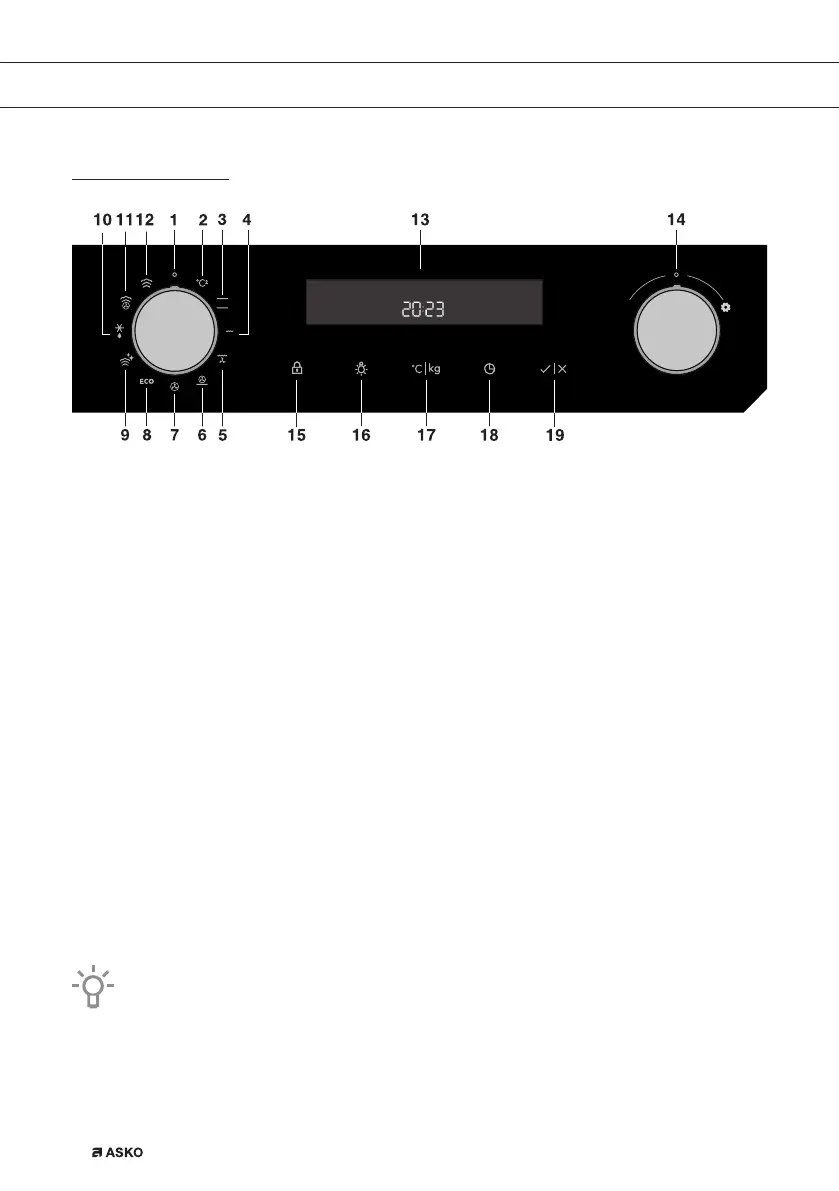
Control panel
1. Function knob (in ‘Off’ position)
2. Fast preheat
3. Upper and bottom heater
4. Grill
5. Grill with fan
6. Hot air and bottom heater
7. Hot air
8. Eco cooking
9. Cleaning
10. Defrosting
11. Combi steam
12. Steam
13. Cooking information and clock display
14. Settings knob (-/+)
15. Child lock key
16. Oven lighting on/off key
17. Temperature / Weight
18. Electronic program timer
19. Start/stop key
Symbols of cooking systems may be located on the knob or on the front panel
(depending on the appliance model).
The keys will respond better if you touch them with a larger area of your fingertip. Each
time you press a key, a short acoustic signal will be sounded.
861441_en_naslovnica_drug_papir.indd EN8861441_en_naslovnica_drug_papir.indd EN8 10. 09. 2021 10:05:5210. 09. 2021 10:05:52



 To Next Page