24
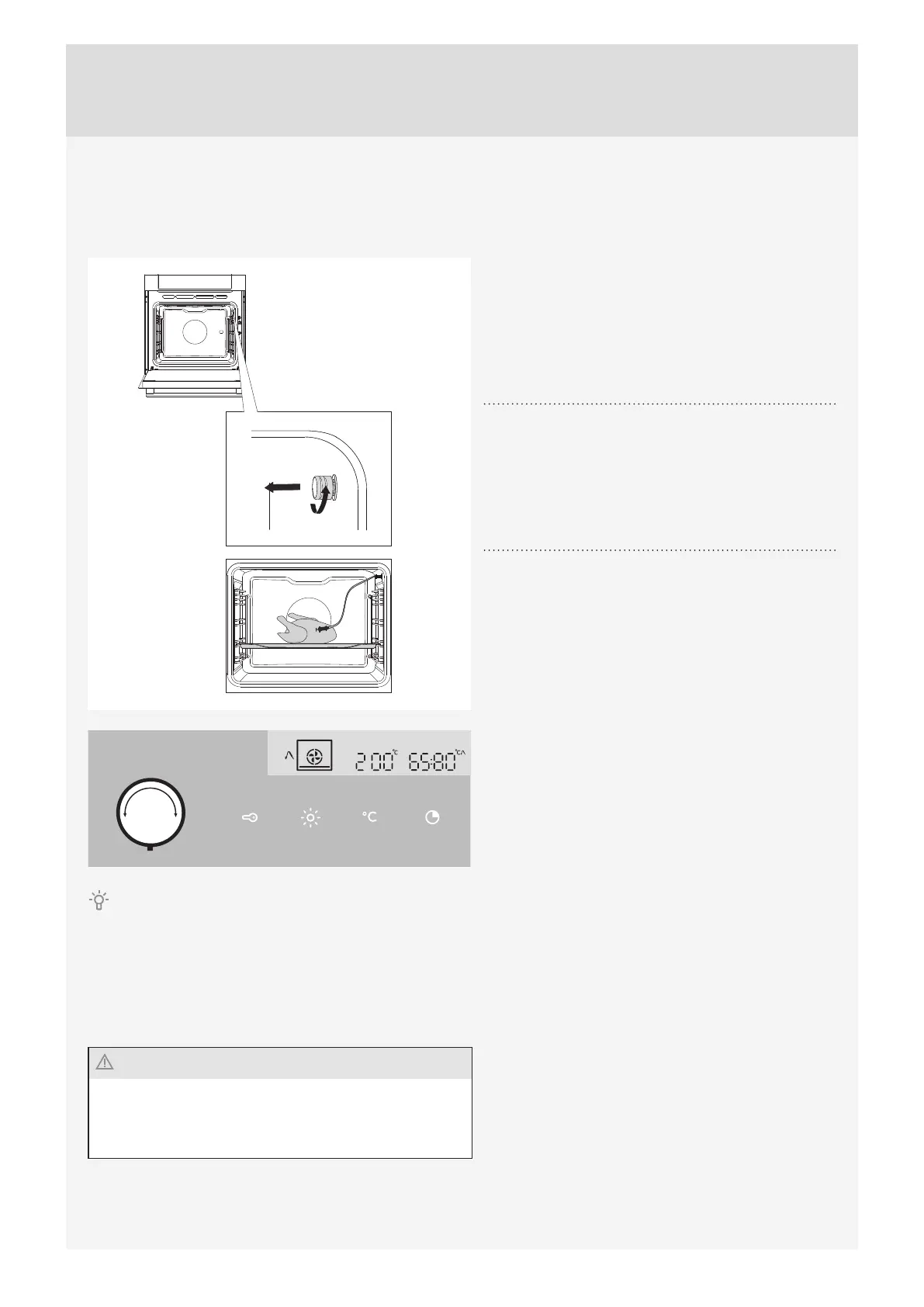
Roasting with a meat probe (depending on the model)
In this mode, set the desired temperature of the food core. The oven operates until the food core reaches the set
temperature. Temperature core is measured by the temperature probe.
1
Remove the metal cap (the socket is in the front
upper corner of the oven right wall).
2
Connect the meat probe plug to the socket and stick
the probe into the food. (If any timer settings were
activated, they will be cancelled.)
3
Turn the COOKING SYSTEM SELECTOR
KNOB (hot air and lower heater). Symbol, preset
temperature, probe temperature, and set temperature
will appear on the display. Press the START key.
During the cooking process, the display will alternate between current and set temperature in the oven. The
temperature may be adjusted during operation.
When the set core temperature is reached, the cooking process will stop.
An acoustic signal will be heard which you may turn off by touching any key. After one minute, the acoustic signal will be
switched off automatically. Clock will appear on the display.
After the cooking process, replace the protective cap of the meat probe socket.
Only use the probe intended for use with your oven.Make
sure the probe does not touch the heater during cooking.
After the cooking process, the probe will be very hot. Take
care to prevent burning.



 To Next Page