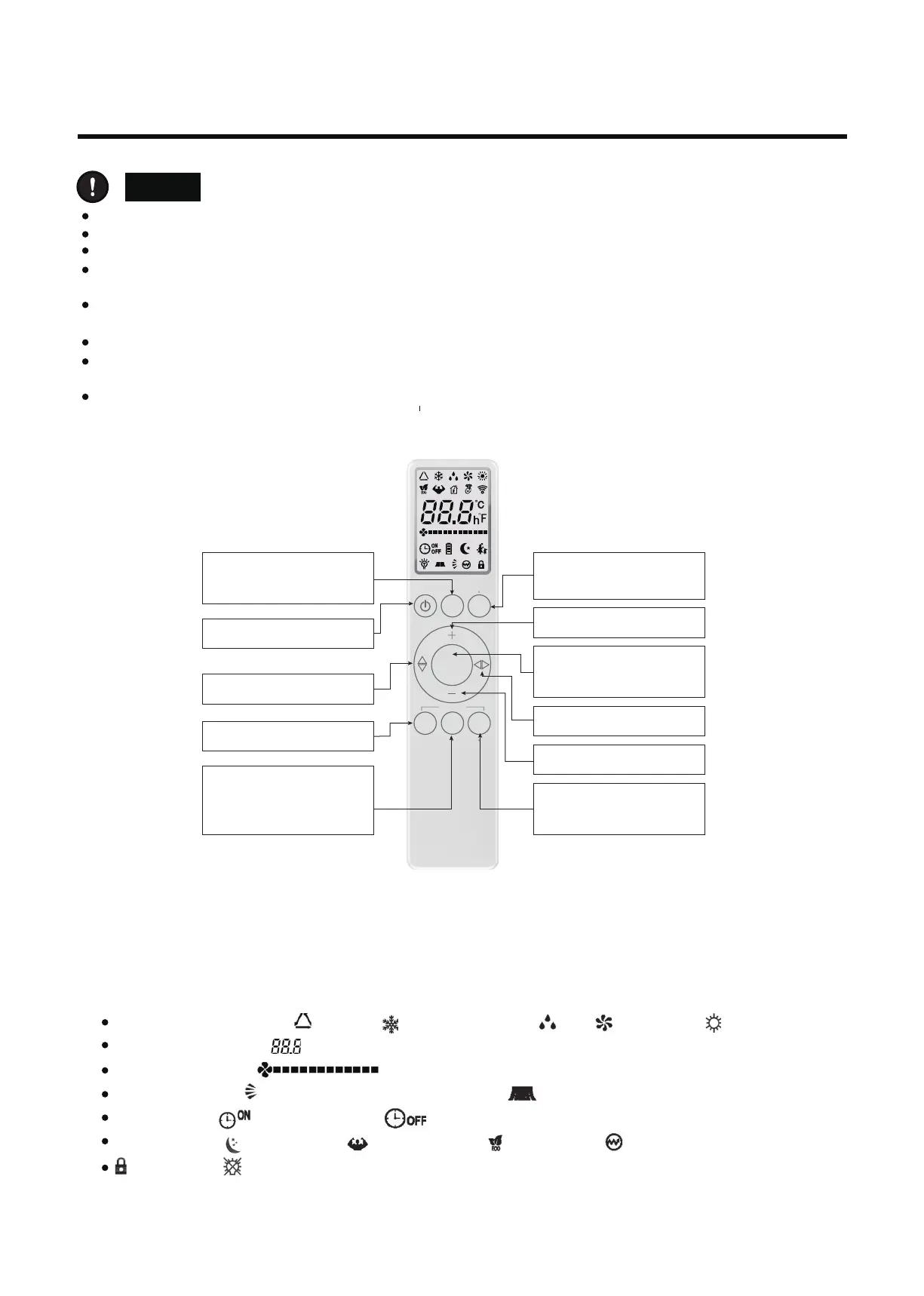
1)The remote controller is equipped with 11 buttons, and the LCD is newly made.
2)At the first power on, the LCD of the remote controller displays all the icons first and then enters the
standby state, displaying only t he mode icon.
3)Introduction of LCD screen icon:
Mode display: automatic , cooling , dehumidification , f an and heating .
Temperature display: displays temperat ure, whic
h range between16~32˚C or 61~90
℉.
Wind speed display: means wind speed.
Swinging display: means external pendulum wind. means internal pendulum wind.
Timer display: means TIMEON. means TIMEOFF.
Other display: means sleep; means TURBO; means ECO; means electric heating;
means lock; means
lamplight.
Do not place remote controller near heat sources such as electric blankets or heating furances.
Do not place remote controller in direct sunlight.
Be careful not to drop, otherwise it may cause damage.
No obstacle between the signal receiver and the remote controller, so as not to affect the transmission and
reception of the
signal.
Point the remote controller to the air conditioner, press the button on the remote controller, and send the
command signal to the air conditioner.
If the signal is
received correctly, the air conditioner will issue a "beep" prompt.
If the remote controller is not available, please replace the new battery and try again. But if the problem persists,
please contact the seller or our authorized service center.
The following two kinds of remote controllers is model 1 and model 2, will add another new remote controllers.
3. Remote Controller Manual
: G-SA-T0 1EN G-2
80 2 00 0 19 0 31 8
Caution
:
1. The icon meaning of remote controller model 1
5
3.2 Instructions of remot controller model 1
Turbo
Enter the turbo function.Decide
whether to have this function
according the actual model.
Mode
Select modes, including automatic,
cooling, dehumidification, fan and
heating mode.
Sleep
Enter the sleep function. Decide
whether to have this funciton
according to the actual model.
Fan speed
Reduce fan speed in one gear.
Minimum wind speed will switch to
the automatic wind, and switch to
the highest wind when pressing
“ON/OFF”
Open or close the air-conditioner.
Temperature addtion
Increase the setting temperature.
Left and right swinging
Open the internal pendulum wind.
Temperature reduction
Decrease the setting temperature.
UP and down swinging
Open the external pendulum wind.
Timer
Setting timing ON/OFF.
ECO
Automatically setting 26℃ in
cooling or heating mode.
LIGHT LOCK
CLEAN
TURBO
TIMER
FAN
SLEEP
ECO
IFEEL
MODE
IONIZER


 To Next Page