
 Need help?
Do you have a question about the ASROCK B75M-ITX and is the answer not in the manual?
Lists the items included in the motherboard package.
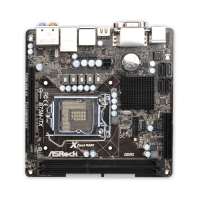
Details the technical specifications of the motherboard.
Guidance on using screw holes to secure the motherboard.
Important safety and handling precautions before installation.
Step-by-step instructions for installing the CPU.
Procedure for installing the CPU cooler and fan.
Steps for installing RAM modules into the DIMM slots.
Instructions for installing expansion cards into the PCIe slot.
Guide to setting up dual monitor and surround display configurations.
Instructions for installing and using the ASRock Smart Remote feature.
Explanation of jumper settings, including Clear CMOS.
Details on various onboard headers and connectors on the motherboard.
Guide for installing SATA, SATA2, and SATA3 hard disk drives.
Explanation of the Hot Plug feature for SATA drives.
Detailed guide on how to use SATA HDD Hot Plug feature.
Instructions for installing motherboard drivers from the support CD.
Steps for installing Windows OS without RAID.
Overview of the UEFI SETUP UTILITY and how to enter it.
Description of the main menu bar options in the UEFI utility.
Explanation of keyboard navigation keys within the UEFI utility.
Details of the system overview displayed on the Main UEFI screen.
Configuration options for overclocking features.
Section for advanced system configurations.
Settings related to CPU features and performance.
Settings for the North Bridge chipset features.
Settings for the South Bridge chipset features.
Configuration options for storage devices like SATA.
Configuration for Intel Rapid Start Technology.
Configuration for Intel Smart Connect Technology.
Settings for ACPI power management features.
Settings for USB controllers and legacy support.
Monitors system hardware status like temperature and fan speed.
Configuration of system boot settings and device priority.
Settings for system passwords and security.
Options for saving, discarding changes, and exiting the UEFI utility.
Guidance on installing compatible operating systems.
Information about the included Support CD and its contents.
Instructions on how to run the Support CD.
Details about the Drivers Menu on the Support CD.
Details about the Utilities Menu on the Support CD.
Information on how to contact ASRock for support.
 General
| ECC | No |
|---|---|
| Non-ECC | Yes |
| Memory voltage | 1.5 V |
| Memory channels | Dual-channel |
| Memory slots type | DIMM |
| Number of memory slots | 2 |
| Supported memory types | DDR3-SDRAM |
| Maximum internal memory | 16 GB |
| Supported memory clock speeds | 1066, 1333, 1600 MHz |
| Supported memory module capacities | 1GB, 2GB, 4GB, 8GB |
| System bus rate | 5 GT/s |
| Processor socket | LGA 1155 (Socket H2) |
| Processor manufacturer | Intel |
| Compatible processor series | Intel Core i3, Intel Core i5, Intel Core i7 |
| Maximum number of SMP processors | 1 |
| Number of SATA II connectors | 3 |
| Number of Parallel ATA connectors | 0 |
| HDMI version | 1.4a |
| Headphone outputs | 5 |
| USB 2.0 ports quantity | 4 |
| Audio chip | Realtek ALC892 |
| Cooling type | Passive |
| Certification | FCC, CE, WHQL, ErP/EuP Ready |
| Component for | PC |
| Power source type | ATX |
| Motherboard chipset | Intel B75 |
| PC health monitoring | CPU, FAN, Temperature |
| Audio output channels | 7.1 channels |
| Motherboard form factor | mini ITX |
| Compatible operating systems | Windows 7, Vista, XP 32/64-bit |
| Supported storage drive interfaces | SATA II, SATA III |
| Cables included | SATA |
| Graphics card | HD Graphics |
| OpenGL version | 3.2 |
| DirectX version | 11 |
| Maximum resolution | 2048 x 1536 pixels |
| Maximum graphics card memory | 1760 MB |
| Parallel processing technology support | Not supported |
| PCI Express slots version | 3.0 |
| PCI Express configurations | 1x16 |
| LAN controller | Realtek RTL8111E |
| Networking features | Gigabit LAN |
| Ethernet interface type | Gigabit Ethernet |
| BIOS type | EFI AMI |
| ACPI version | 1.1 |
| BIOS memory size | 64 Mbit |
 Weight and Dimensions
| Width | 170 mm |
|---|




 To Next Page
