8
2.4 Setting the BIOS RAID Items
After installing the hard disk drives, please set the necessary
RAIDitemsintheBIOSbeforesettingyourRAIDconguration.
Boot your system, and press <F2> key to enter BIOS setup
utility.GotoAdvanced Storage Congurationandsetthe
option SATA Mode Selection to [RAID]. Press <F10> key to
saveyourchangebeforeyouexitBIOSsetup.
2.5 Conguring a RAID array
YoucancongureaRAIDarrayusingeitherUEFISetupUtility
or Intel
®
RAIDBIOSsetuputility.
2.5.1 Conguring a RAID array Using UEFI Setup Utility
STEP 1:
For Windows
®
8:
Go to UEFI SETUP UTILITY Boottoset“FastBoot”to[Ultra
Fast].
or
Go to UEFI SETUP UTILITY Boottodisable“CSM”.
For Windows
®
7:
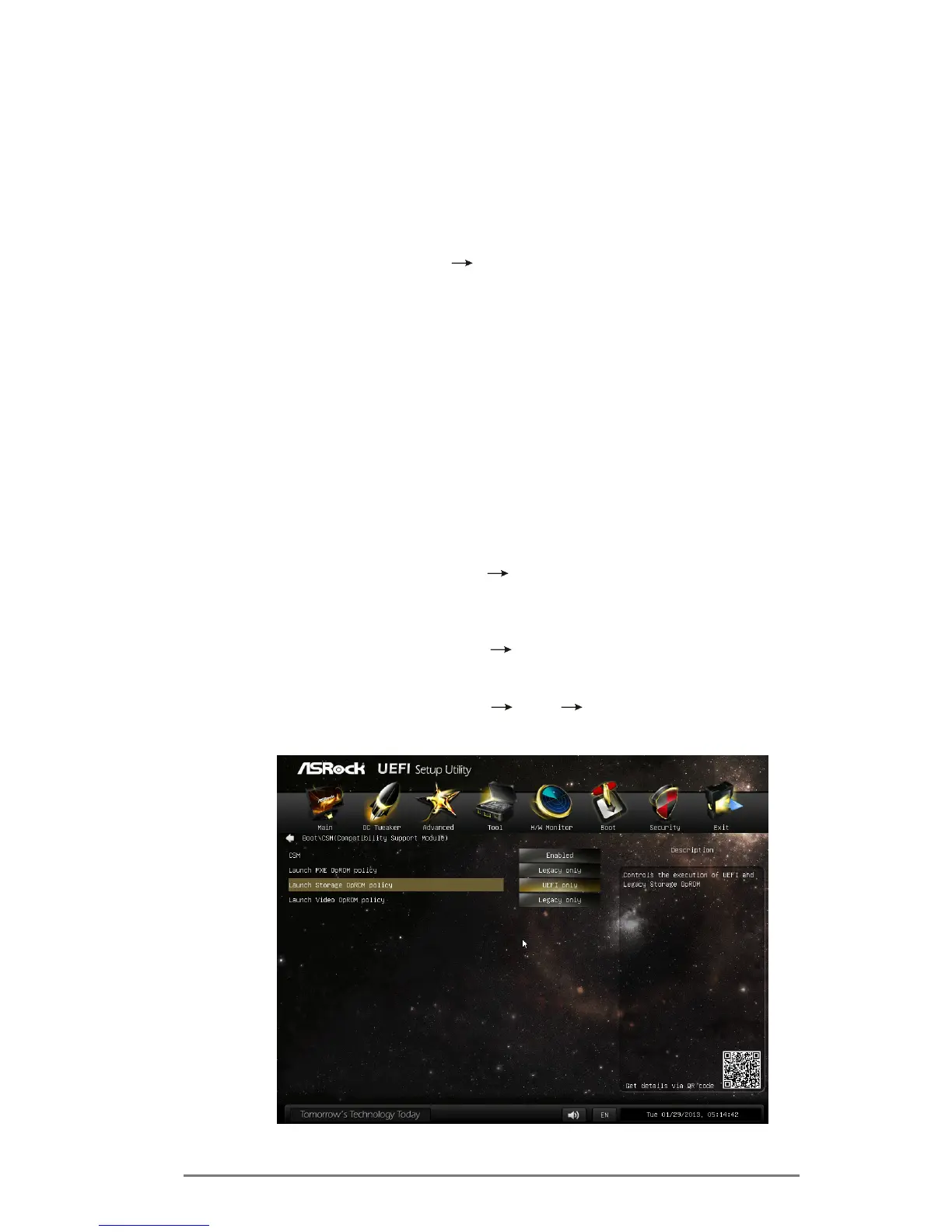
Go to UEFI SETUP UTILITY Boot CSM toset“Launch
StorageOpROMpolicy”to[UEFIonly].



 To Next Page
 Loading...