57
Internet Flash
Internet Flash searches for available UEFI firmware updates from our
servers. In other words, the system can auto-detect the latest UEFI from
our servers and ash them without entering Windows OS. Please note
that you must be running on a DHCP congured computer in order to en-
able this function.
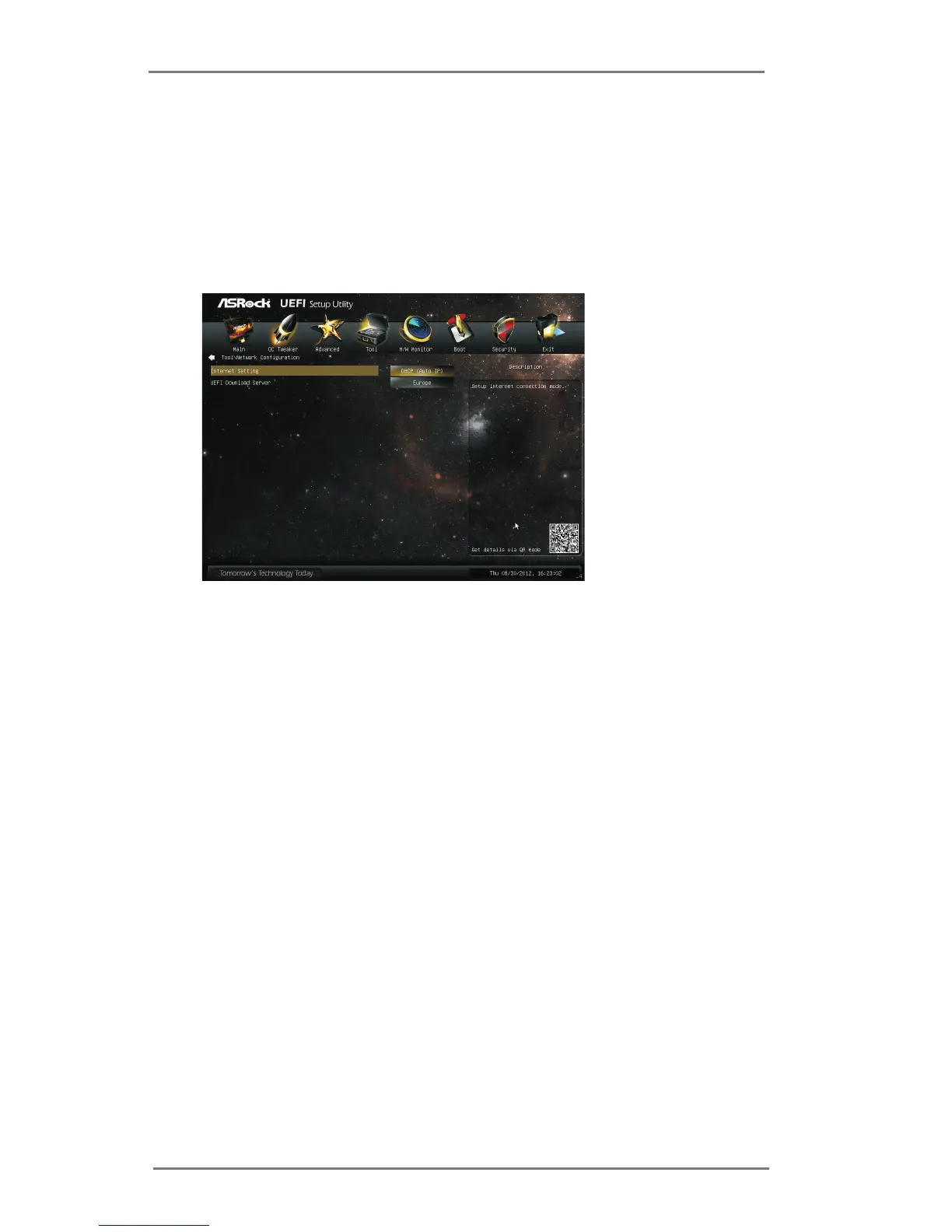
Network Conguration
Internet Setting
Use this item to set up the internet connection mode. Conguration
options: [DHCP (Auto IP)] and [PPPOE].
UEFI Download Server
Use this item to select UEFI rmware download server for Internet Flash.
Conguration options: [Asia], [Europe], [USA] and [China].
Dehumidier Function
Users may prevent motherboard damages due to dampness by enabling
“Dehumidier Function”. When enabling Dehumidier Function, the com-
puter will power on automatically to dehumidify the system after entering
S4/S5 state.
Dehumidier Period
This allows users to congure the period of time until the computer powers
on and enables “Dehumidier” after entering S4/S5 state.
Dehumidier Duration
This allows users to congure the duration of the dehumidifying process
before it returns to S4/S5 state.
Dehumidier CPU Fan Setting
Use this setting to congure CPU fan speed while “Dehumidier” is en-
abled.



 To Next Page