33
English
Z690M PG Riptide/D5
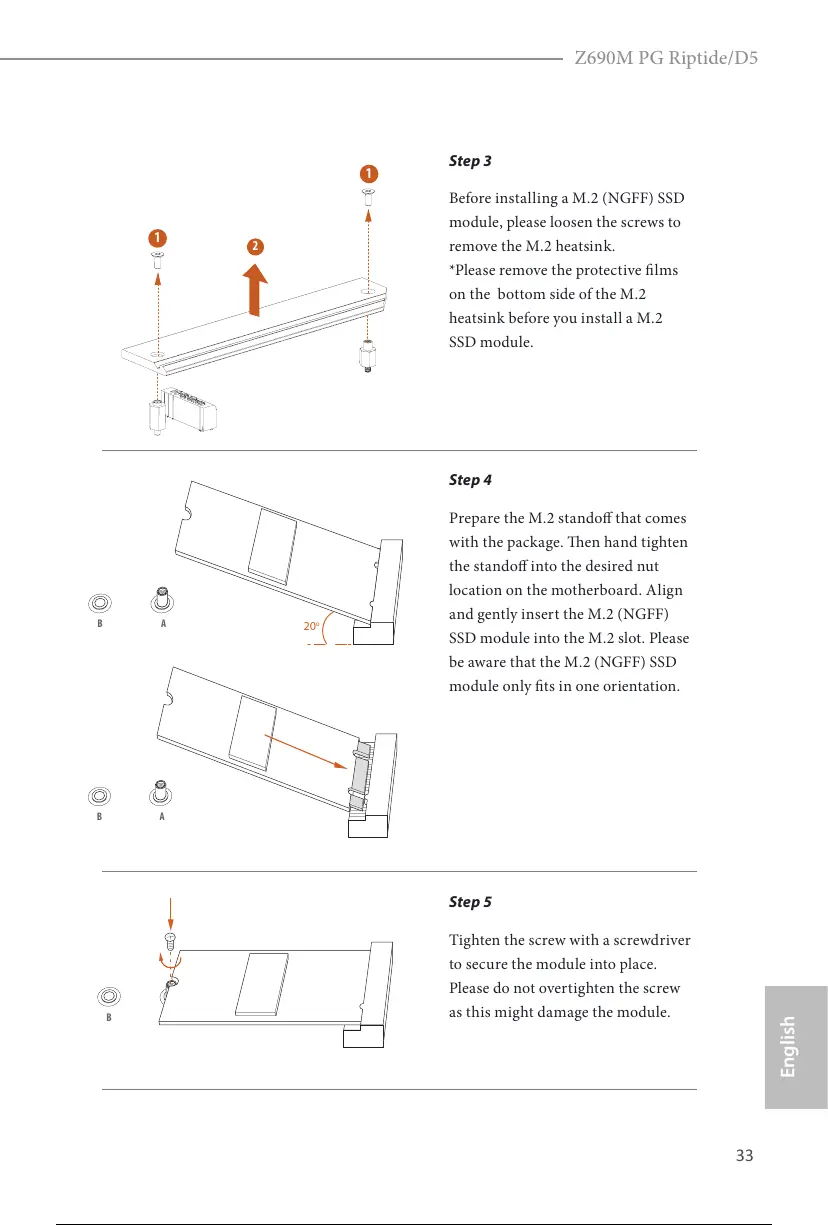
Step 3
Before installing a M.2 (NGFF) SSD
module, please loosen the screws to
remove the M.2 heatsink.
*Please remove the protective lms
on the bottom side of the M.2
heatsink before you install a M.2
SSD module.
Step 4
Prepare the M.2 stando that comes
with the package. en hand tighten
the stando into the desired nut
location on the motherboard. Align
and gently insert the M.2 (NGFF)
SSD module into the M.2 slot. Please
be aware that the M.2 (NGFF) SSD
module only ts in one orientation.
Step 5
Tighten the screw with a screwdriver
to secure the module into place.
Please do not overtighten the screw
as this might damage the module.
AB
20
o
AB
NUT1NUT2B
1
2
41 / 113








 To Next Page