SD-04 Rev. A
SECTION 5 - ADDING OR CHANGING THE HARD CODE
Before entering any codes – A quick caution regarding code “sub-sets”. Your
Digital Keypad will not let you enter a code that is a sub-set of a previously entered
code. For example if you already have a code entered such as “1-3-3-5-8” and
then attempt to enter “3-3-5” in another address location you Digital Keypad will
reject the attempt. The Digital Keypad will indicate this rejection to you by
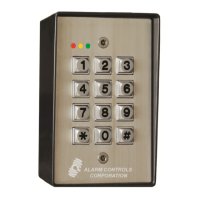
illuminating a long single flash on the Red LED (or the Green LED if Reverse Light
Logic is used). (see section 3 - WHAT ARE THOSE LED’s TELLING ME?) It is
advisable to keep a log of your various codes to avoid this problem by denoting
which code is stored in which address. We have created a blank form for you and it
is available by contacting us here at Securitron Technical Support.
You must first locate the CPU board. On the printed circuit board (see Figure 2)
locate the two small buttons located in one corner. Push and hold for one second
the push button labeled “Hard Code”. Quickly return to the keypad (as function will
time out in thirty seconds). The Yellow LED will be slowly flashing (indicating that
you are in the Hard Code program mode. Enter the code that you wish to use. Do
not pause between keystrokes. Now wait until the Red LED flashes twice (or
possibly green LED if Reverse Light Logic is turned on). Your new Hard Code is now
in the Digital Keypad.
SECTION 6 - ADDING OR CHANGING THE PROGRAM CODE
Before entering any codes – A quick caution regarding code “sub-sets”. Your
Digital Keypad will not let you enter a code that is a sub-set of a previously entered
code. For example if you already have a code entered such as “1-3-3-5-8” and
then attempt to enter “3-3-5” in another address location you Digital Keypad will
reject the attempt. The Digital Keypad will indicate this rejection to you by
illuminating a long single flash on the Red LED (or the Green LED if Reverse Light
Logic is used). (see the section 3 - WHAT ARE THOSE LED’s TELLING ME?) It
is advisable to keep a log of your various codes to avoid this problem by denoting
which code is stored in which address. We have created a blank form for you and it
is available by contacting us here at Securitron Technical Support.
If you do not already have a Program Code in your Digital Keypad you must locate
the CPU board. On the printed circuit board (see Figure 2) locate the two small
buttons located in one corner. Push and hold for one second the push button
labeled “PRMG CODE”. Quickly return to the keypad (as the function will time out
in thirty seconds). The Yellow LED will be rapidly flashing (indicating that you are
Released: 8/27/2009
Securitron Magnalock Corp.



 To Next Page