RC9 – ORP AND/OR PH PROBE CALIBRATION
1. Using the POOL MODE button, switch the RC9 to manually off. Before proceeding, clean the probe to be
calibrated with an abrasive crème cleanser such as Jiff. DO NOT USE ACID. Once cleaned, flush with water and
allow to sit for 4 – 5 minutes before continuing with calibration.
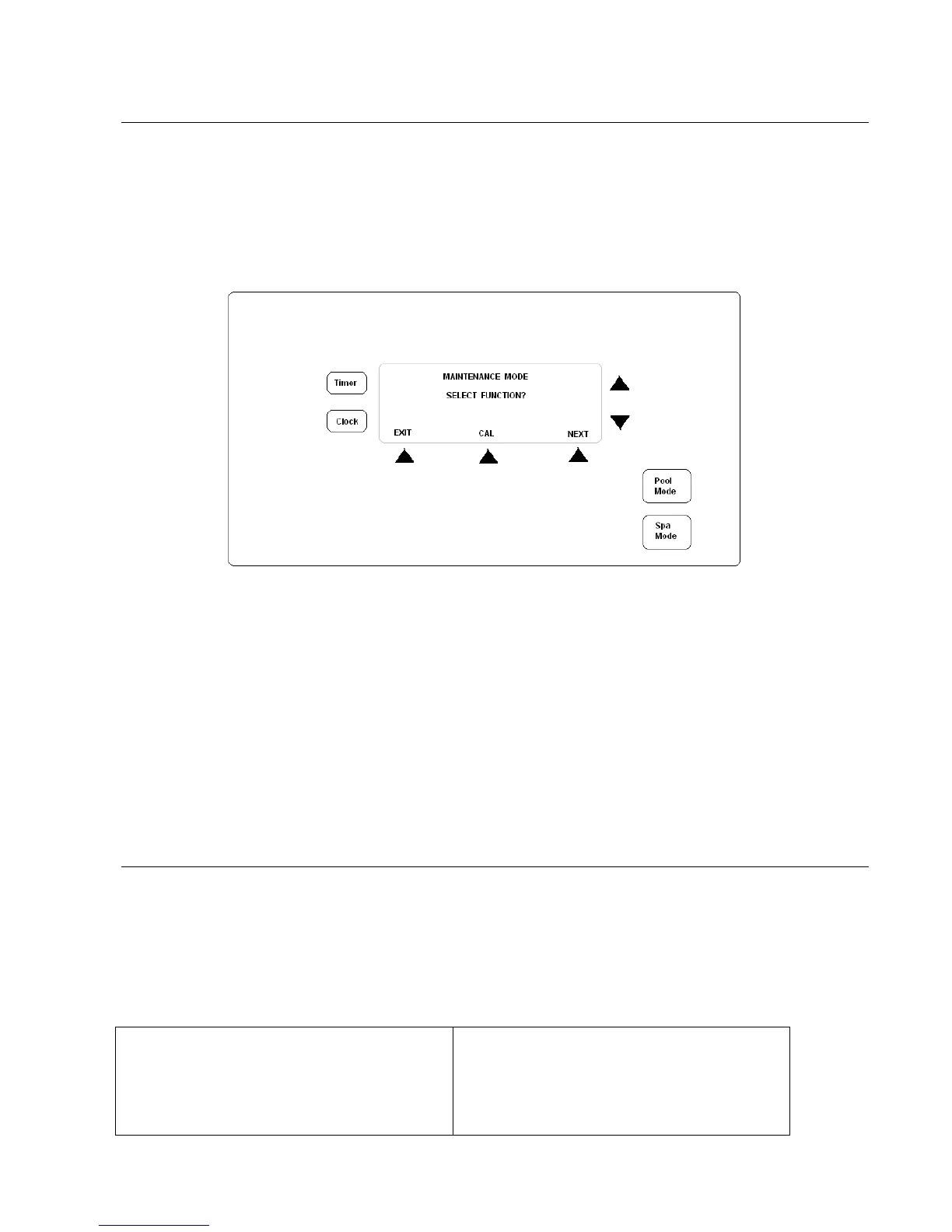
2. Select the MAINT option and the following screen will be shown;
3. Select CAL option. Then select either PH or ORP calibration based on the option provided.
4. Once you have selected which probe you wish to calibrate you will be asked “Select Filter Pump On?” This option
decides if the filtration pump is to be running during the calibration process.
i. If you are calibrating by leaving the probes in the mixing cell and using the pool water for
reference, select YES.
ii. If you are using a calibration solution (available from AstralPool dealers) select NO.
5. Once you have selected Yes or No, the display will indicate the unit is measuring the current level. Once the
reading is completed, the current pH or ORP reading will be displayed on the screen. Using the Up and Down
arrows, change the reading to reflect the calibration solution level or the tested water level. Press ACCEPT.
6. Repeat if required on other probe.
RC9 – ORP AND/OR PH FAULT WARNING INDICATORS
Alarm messages are displayed on the LCD display and more information can be obtained by pressing the INFO button
which appears when an error occurs. The info button also mutes the audible alarm. The Error message will continue to
flash on the screen until the fault(s) are rectified. Typical faults are:
a) High or low chemical levels: This indicates that the pH or ORP are outside set limits
b) SENSOR FAULT: This indicates that there is a problem with the pH or ORP sensing system. Potential issues could
be that the sensor is not connected or that the sensor requires cleaning.
Possible causes for faults


 To Next Page