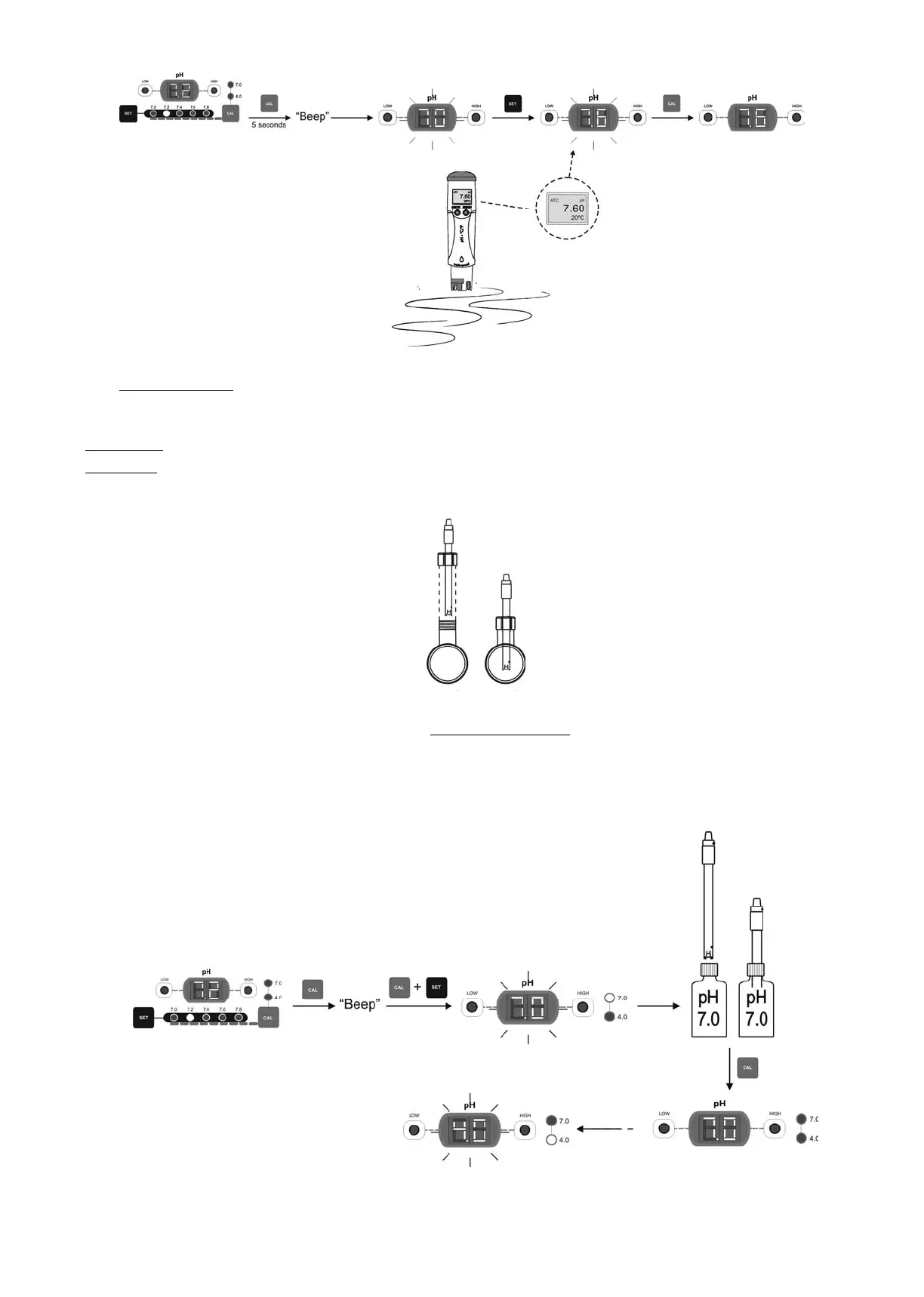
22
Fig. 30
6.2.2. “STANDARD MODE”
“STANDARD” MODE allows the precise calibration of the pH-sensor using two calibration solutions of pH 7.0 and 4.0, however this method
requires that the pH-sensor is removed from the installation.
PROCEDURE:
IMPORTANT: before closing the by-pass valves, stop system from control panel (see Section 5.1).
1. Extract the pH-sensor from the holder and wash it with tap water.
Fig. 31
2. Press the “CAL” [18] key until the equipment beeps. Without releasing the key, press “SET” [21] for a few seconds until the pH
screen displays a blinking “7.0”. The calibration light “7.0” [17] will remain on.
3. Gently shake the sensor to remove any possible drops of water and insert in the standard pH=7.0 solution (green). Gently shake
for a few seconds and press “CAL” [18]. Once stabilised, the screen [15] will display a blinking “4.0”. The calibration light “4.0” will
remain on [17].
Fig. 32




 To Next Page