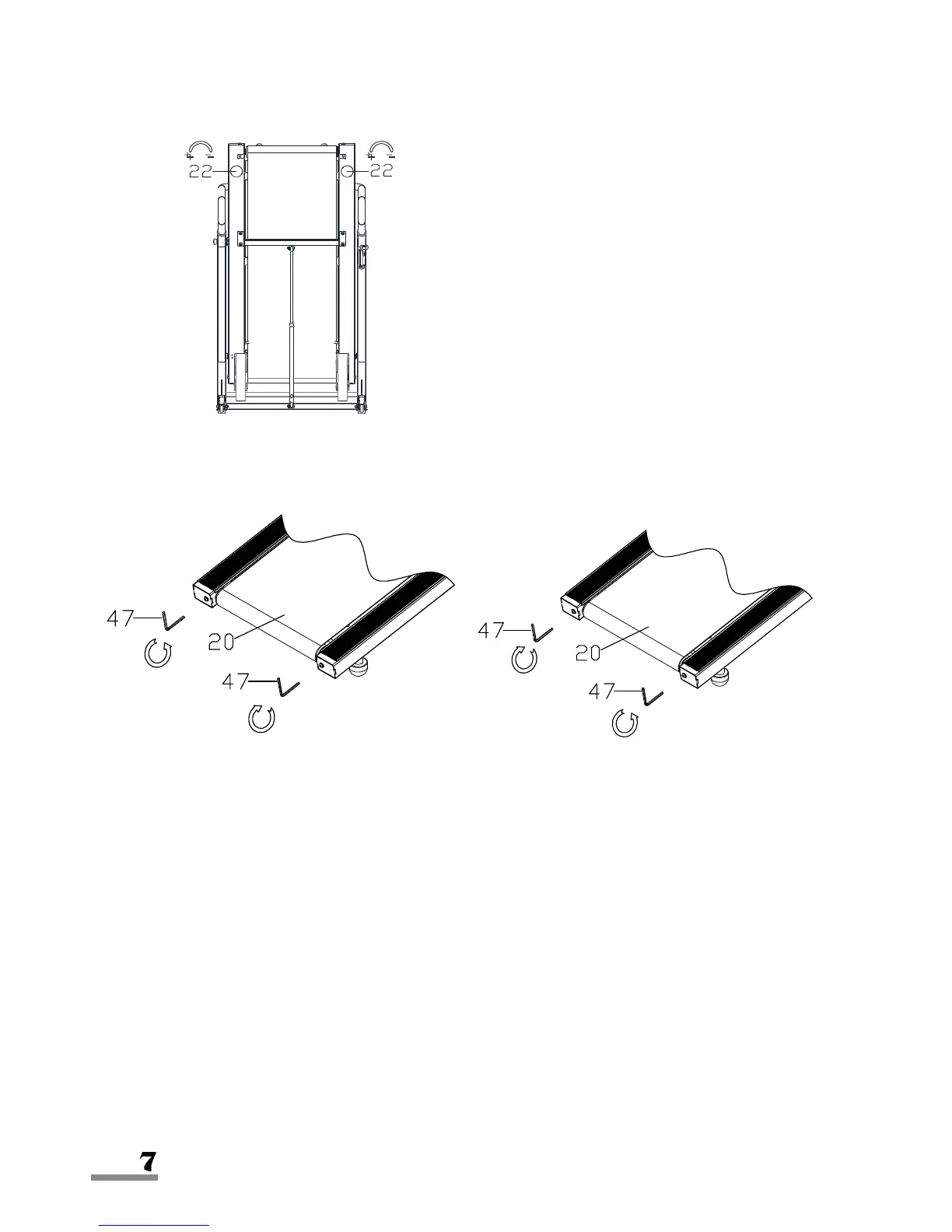
ADJUSTING THE INCLINE
ADJUSTING THE BELT
Picture A Picture B
Use Allen Wrench (No. 47) to adjust the Running Belt (No. 20).
1. If the Running Belt (No. 20) deviates to the right, turn the right side adjusting bolt
clockwise by 1/2 circle, then turn the left side adjusting bolt counter-clockwise
by 1/2 circle (Refer to Picture A).
2. If the running belt deviates to the left, turn the left adjusting bolt clockwise by
1/2 circle, then turn the right side adjusting bolt counter-clockwise by 1/2 circle
(Refer to Picture B).
Continue adjusting until the treadmill is belt is centered.
To adjust the incline, fold the treadmill first.
Adjust the incline of the treadmill by turning the


 To Next Page