22
Notebook PC User Manual
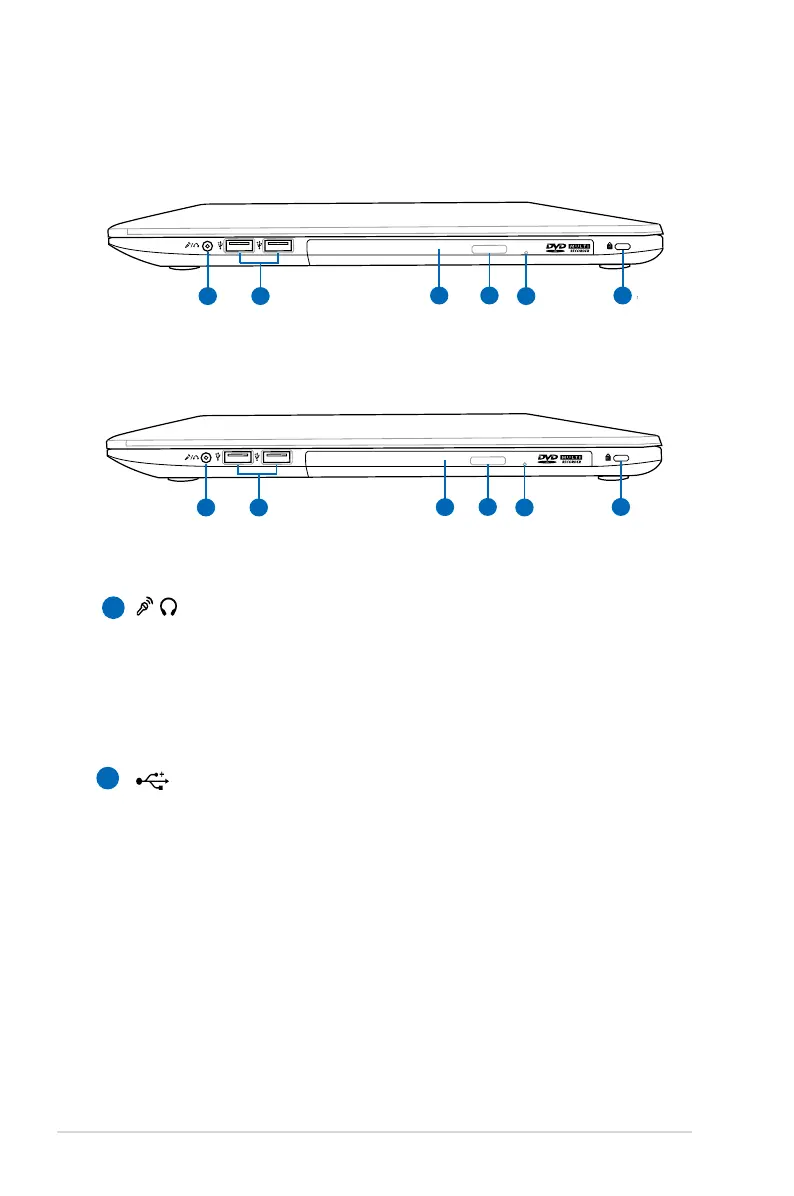
Right Side
1
2
/ Headphone Output/Microphone Input Combo Jack
This combo jack can be used to connect the Notebook PC's
audio out signal to amplified speakers or headphones, or
can be used to connect an external microphone or output
signals from audio devices. This jack automatically detects
the connecting device and switches functions.
USB Port (2.0)
The USB (Universal Serial Bus) port is compatible with USB
2.0 or USB 1.1 devices such as keyboards, pointing devices,
cameras, hard disk drives, printers, and scanners connected
in a series up to 12Mbits/sec (USB 1.1) and 480Mbits/sec
(USB 2.0). USB allows many devices to run simultaneously
on a single computer, with some peripherals acting as
additional plug-in sites or hubs. USB supports hot-swapping
of devices so that most peripherals can be connected or
disconnected without restarting the computer.
15" model
14" model



 To Next Page