44
Notebook PC User Manual
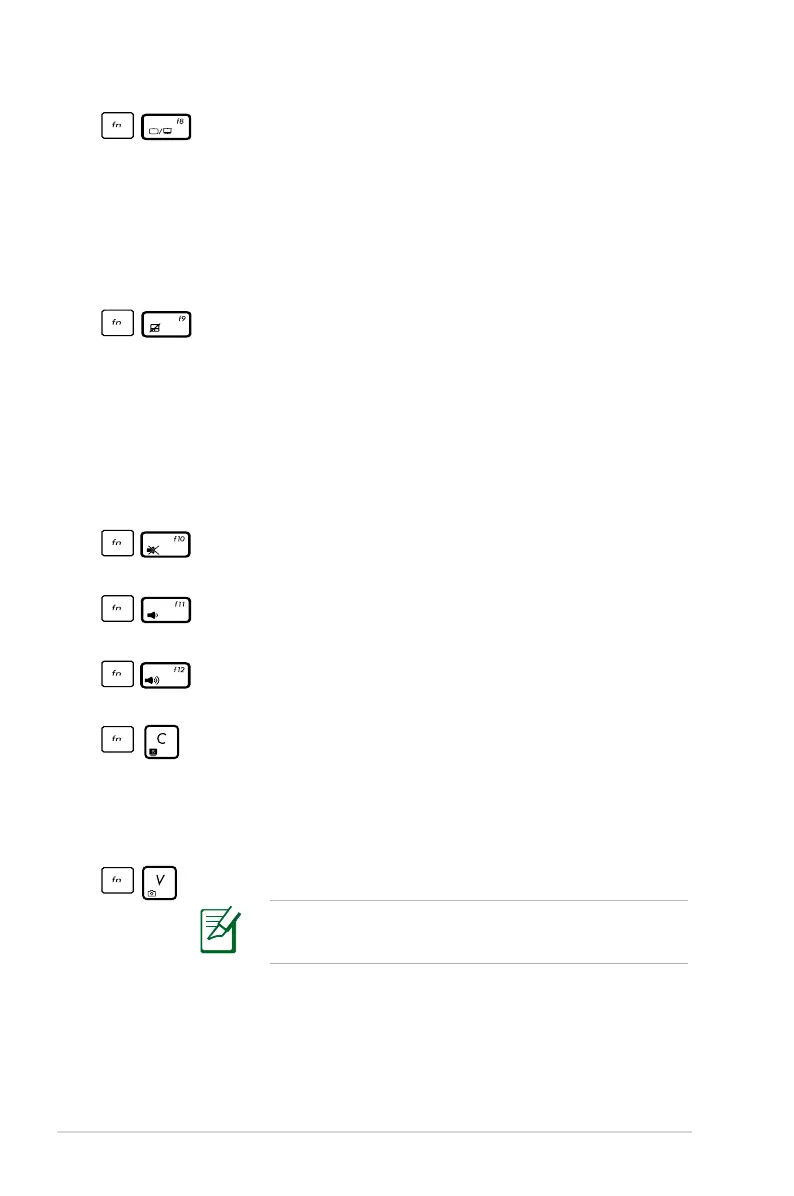
LCD/Monitor Icons (f8): Toggles between the Notebook
PC’s LCD display and an external monitor in this series:
LCD Only -> CRT Only (External Monitor) -> LCD + CRT
Clone -> LCD + CRT Extend. (This function does not
work in 256 Colors, select High Color in Display Property
Settings.) NOTE: Must connect an external monitor
“before” booting up.
Crossed-out Touchpad (f9): Toggles the built-in
touchpad LOCKED (disabled) and UNLOCKED (enabled).
Locking the touchpad will prevent you from accidentally
moving the pointer while typing and is best used with an
external pointing device such as a mouse. NOTE: Selected
models have an indicator between the touchpad buttons
will light when the touchpad is UNLOCKED (enabled) and
not light when the touchpad is LOCKED (disabled).
Crossed Speaker Icons (f10): Toggles the speakers ON
and OFF (only in Windows OS)
Speaker Down Icon (f11):
Decreases the speaker volume (only in Windows OS)
Speaker Up Icon (f12):
Increases the speaker volume (only in Windows OS)
fn+C: Toggles the “Splendid Video Intelligent
Technology” function so you can switch between these
display color enhancement modes: Gamma Correction,
Vivid Mode, Theater Mode, Soft Mode, My Profile, and
Normal.
fn+V: Toggles “Life Frame” software application.
For some models, this function is available only
when you enable the camera.



 To Next Page