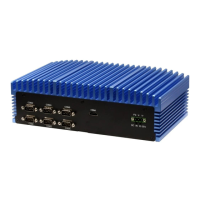
This document describes the BOXER-6641, a fanless embedded box PC.
Function Description:
The BOXER-6641 is a fanless embedded box PC designed for various industrial applications. It supports a range of Intel® processors, including Xeon®, Core™ i9, i7, i5, i3, Pentium®, and Celeron® series, making it suitable for diverse performance requirements. The system is designed for fanless operation, which contributes to its reliability and suitability for environments where dust and noise are concerns. It offers extensive I/O capabilities, including multiple HDMI ports, GbE LAN ports, USB 3.2 Gen 1 and USB 2.0 ports, and DB-9 connectors for RS-232/422/485 serial communication. Audio input/output is also supported. For expansion, it includes full-size Mini PCIe and Mini Card slots, with the Mini Card slot offering PCIe/mSATA switchability. A SIM slot is also available. The device is designed for wall mounting and has a robust mechanical and environmental specification, allowing it to operate in a wide range of temperatures and withstand vibrations.
Important Technical Specifications:
-
System:
- CPU: Intel® Xeon® E-2124G (A2 & A6 models only), Intel® i9-9900T, Intel® i7-9700TE, Intel® i7-8700T, Intel® i5-8500T, Intel® i3-8100T, Pentium® G5400T, Celeron® G4900T.
- Chipset: Intel® C246/H310.
- System Memory: DDR4-2666 SO-DIMM slot x 2, up to 64GB, ECC or Non-ECC Supported.
- Display Interface: HDMI x 2.
- Storage Device: 2.5” SATA HDD/SSD Bay x 1 (A1, A5) or x 2 (A2, A6).
- Ethernet: Intel® i211 x 3, i219 x 1.
- I/O: HDMI x 2, RJ-45 x 4 for GbE LAN, USB3.2 Gen 1 x 4, USB2.0 x 4 (A1, A5 model) or USB 3.2 Gen 1 x 8 (A2, A6 model), DB-9 x 6 for RS-232/422/485, Audio x 1 (MIC-in, Line-out), 3-pin 10~35V Power Input x 1, Power Button x 1, Remote Power switch x 1, Reset Button x 1, HDD LED x 1, SYS LED x 1.
- Expansion: Full-size Mini PCIe x 1, Full-size Mini Card x 1 (PCIe/mSATA switch by BIOS, Default: mSATA), SIM slot x 1.
- Indicator: HDD LED x 1, SYS LED x 1.
- OS Support: Windows® 10 64-bit, Linux Ubuntu 18.04.
-
Power Supply:
- Power Requirement: 3-pin DC Input 10~35V.
-
Mechanical:
- Mounting: Wall mount.
- Dimensions (W x H x D): 10.4” x 3.19” x 6.15” (264.2mm x 80.92mm x 156.2mm).
- Gross Weight: 10.4 lbs. (4.7 kg).
- Net Weight: 8.2 lbs. (3.7 kg).
-
Environmental:
- Operating Temperature: -4°F ~ 131°F (-20°C ~ 55°C) with 0.5 m/s airflow – with TDP ≤ 35W CPU; -4°F ~ 113°F (-20°C ~ 45°C) with 0.5 m/s airflow – with TDP >35W CPU.
- Storage Temperature: -40°F ~ 176°F (-40°C ~ 80°C).
- Storage Humidity: 5 ~ 95% at 40°C, non-condensing.
- Anti-Vibration: 2 Grms/ 5 ~ 500Hz/ operation – SSD/mSATA; 1 Grms/ 5 ~ 500Hz/ operation – HDD.
- Certification: CE/FCC class A.
Usage Features:
- BIOS Setup: The AMI BIOS ROM provides a pre-installed Setup program for modifying basic system configurations. Users can access the BIOS Setup by pressing
or during power-up. The BIOS allows configuration of various settings including date and time, boot options, network stack, CPU configuration (e.g., virtualization technology, active processor cores, Intel Speed Shift Technology, Turbo Mode, C states, Hyper-Threading), PCH-FW configuration (ME State, AMT BIOS Feature, Firmware Update Configuration, PTT Configuration), SATA configuration (SATA Mode Selection, Aggressive LPM Support, mSATA, Port enable/disable), USB configuration (XHCI Hand-off, USB Mass Storage Driver Support), Hardware Monitor (for system health status), and SIO configuration (Serial Port settings).
- Jumper Configuration: The system features several jumpers (JP19 for ATX/AT Mode Selection and JP24 for CMOS Control Selection) that allow users to configure system behavior. Instructions are provided for setting jumpers to "open" or "closed" positions or by connecting specific pins.
- Connector Details: Detailed pin assignments and signal types are provided for all major connectors, including HDMI ports, COM ports (RS232/RS422/RS485), Mini-Card slots (PCIe1, PCIe2), Digital IO Port, LPC Port, Audio I/O Ports, SPI Flash Port, SATA Ports, USB 2.0 Wafer Box, SATA PWR, DC-IN Connector, LAN (RJ-45) + Dual USB3.2 Gen 1 connectors, and SIM Slot. This information is crucial for proper integration and troubleshooting.
- Driver Installation: Drivers for the BOXER-6641 can be downloaded from the AAEON website. The manual provides a step-by-step guide for installing chipset, graphics, ME, LAN, audio, Intel RST, and optional serial port drivers.
- Watchdog Timer Programming: The device includes a watchdog timer, and the manual provides detailed programming information, including SuperIO and Watchdog relative register tables, and C-style code snippets for initial program setup, enabling/disabling the watchdog, configuring parameters, and clearing timeout status.
- Digital I/O Ports: The BOXER-6641 utilizes the FINTEK F81966 chipset for its Digital I/O controller. The manual outlines the procedures for configuring the DIO ports, including entering/exiting MB PnP Mode and modifying configuration registers. It also provides electrical specifications, digital input/output relative register tables, and C-style sample program code for reading pin status and setting output levels.
- I/O Address Map and IRQ Mapping Chart: The manual includes comprehensive I/O address maps and IRQ mapping charts, which are essential for advanced users and developers to understand how system resources are allocated and to avoid conflicts when integrating custom hardware or software.
Maintenance Features:
- Safety Precautions: The manual emphasizes critical safety instructions, including ensuring power source compatibility, proper power cord positioning, disconnecting power before hardware work, avoiding connections while powered, disconnecting for long-term storage, proper cleaning methods, ensuring accessibility to power outlets, keeping the device away from humidity, stable installation, avoiding covering openings, being aware of high temperatures, not touching heatsinks when running, avoiding liquid spills, and grounding oneself to prevent static discharge during internal component installation.
- Troubleshooting: The manual lists situations that require contacting service personnel, such as damaged power cords, liquid intrusion, moisture exposure, unexpected device behavior, physical damage, or obvious signs of damage.
- Environmental Considerations: Users are warned not to leave the device in uncontrolled environments with temperatures exceeding permitted storage temperatures to prevent damage.
- Component Replacement: Instructions are provided for CPU, RAM, and 2.5” SATA drive installation, including screw removal and replacement, thermal pad placement, and bracket installation. Users are advised to refer to Chapter 1 for compatible component specifications.
- Warranty: Users are warned not to disassemble the motherboard to avoid damaging the system or voiding the warranty.
- Thermal Pad Replacement: If the thermal pad is damaged, users are instructed to contact AAEON's salesperson for a new one and to avoid using other brands.
- Assembly/Disassembly: Warnings are given about potential damage to exterior paint, surface, and screw holes from repeated assembly/disassembly, and the importance of using the correct size screwdriver and using it correctly.
- CMOS Battery: The system's CMOS memory uses a backup battery for data retention, and the battery must be replaced when it runs down. The BIOS setup includes a "Clear CMOS" option for resetting CMOS settings.

 Need help?
 General



 To Next Page