ASUS Secure Delete
ASUS Secure Delete makes deleted les completely irrecoverable via a simple drag-and-
drop interface, thus enhancing your data security.
To use ASUS Secure Delete:
1. Do either of the following to launch ASUS Secure Delete:
On Windows
®
7:
• Click the ASUS Secure Delete shortcut on the Windows
®
desktop,
• Click
Start > All Programs > ASUS > ASUS Secure Delete.
On Windows
®
8:
• Click the ASUS Secure Delete shortcut on the Windows
®
desktop,
• Click the ASUS Secure Delete icon from the Start screen.
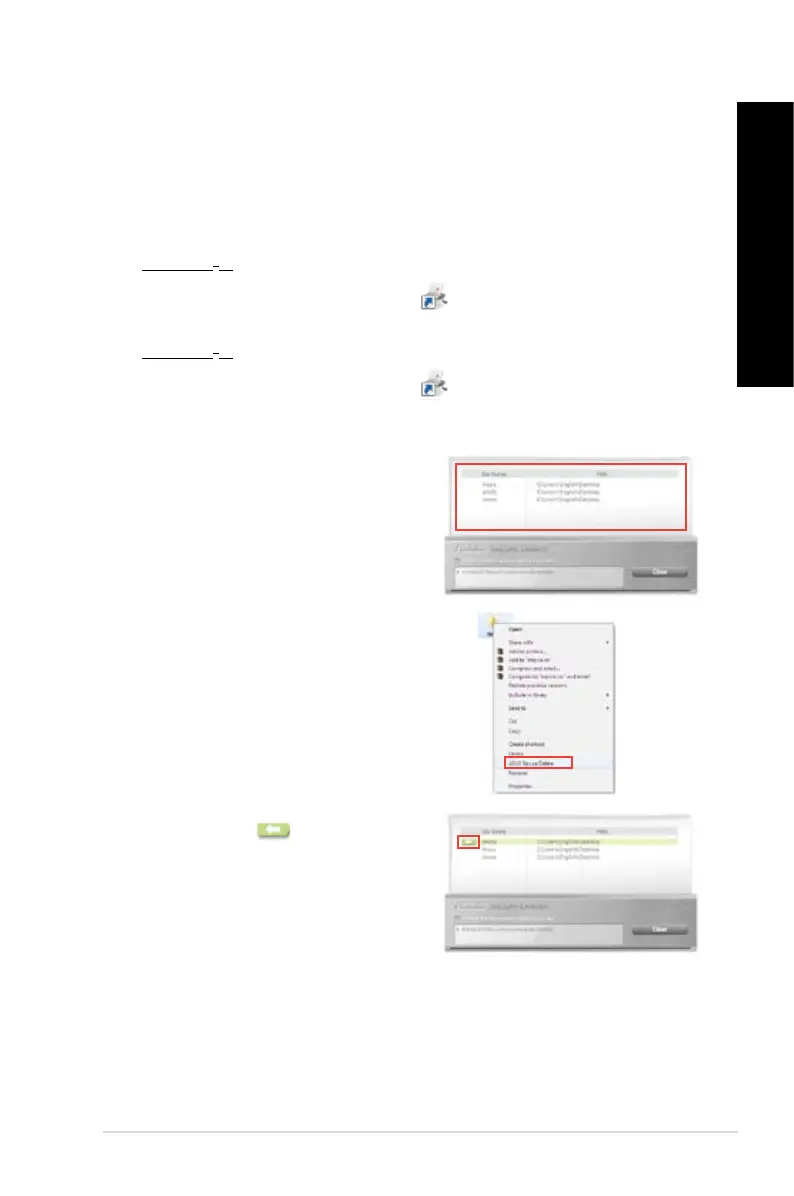
2. Do any of the following to add les to the
deletion box:
• Drag and drop the les to the deletion
box.
3. To remove a le from the deletion list, select
the le, then click .
• Right-click the le then select ASUS
Secure Delete.
ASUS BM6AF, BM1AF, and BP1AF 91
ENGLISH
ENGLISH


 To Next Page