22
ASUS CUV4X-E User’s Manual
3. HARDWARE SETUP
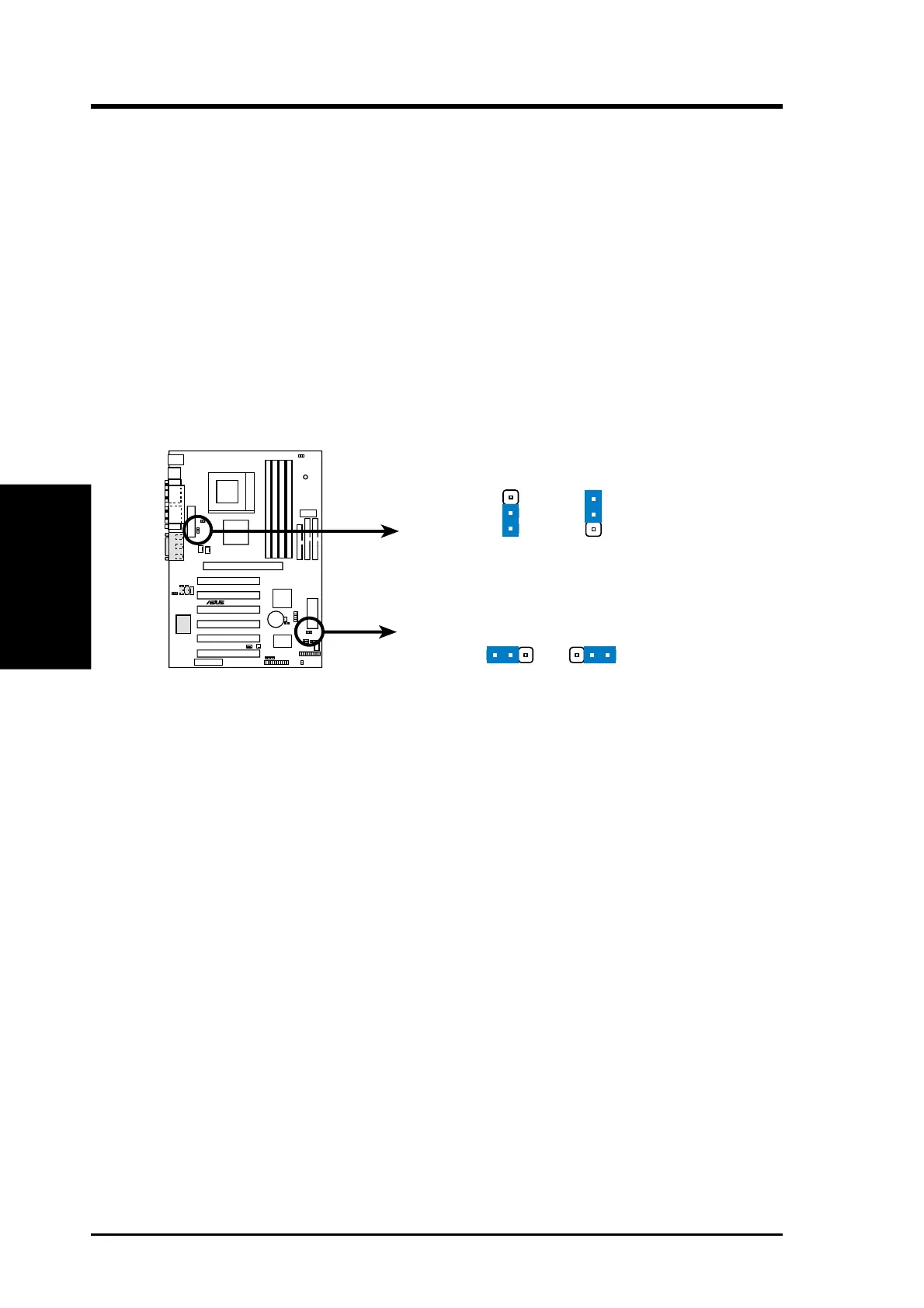
6) USB Device Wake-up Jumpers (3-pin USBPWR0, USBPWR1)
These jumpers allow you to enable or disable the USB feature on the motherboard.
Set these two jumpers to ENABLE if you wish to use the USB devices to wake
up the computer. This feature requires an ATX power supply that can supply at
least 2A on the +5VSB lead. The default setting for both USBPWR0 and
USBPWR0 is DISABLE.
NOTES:
1. Before setting either of these jumpers to ENABLE, make sure that you have
the appropriate power supply, otherwise the computer does not power up.
2. When using the Suspend-to-RAM feature, set these jumpers to ENABLE.
3. The total current consumed must NOT exceed the power supply capability
(+5VSB) whether under normal working conditions or in sleep mode.
CUV4X-E
®
CUV4X-E USB Device Wake Up
Enable
Disable
(Default)
USB_PWR0
2
3
1
2
USB_PWR1
Enable
Disable
(Default)
2
3
1
2
3. H/W SETUP
Motherboard Settings


 To Next Page