Need help?
Do you have a question about the Asus CUSL2-C and is the answer not in the manual?
Explains the structure of the manual, including sections and their content.
Lists the package contents to verify completeness upon purchase.
Details the technical specifications of the ASUS CUSL2-C motherboard, including CPU, chipset, memory, and slots.
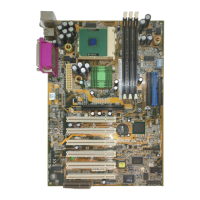
Identifies and locates various components on the CUSL2-C motherboard.
Illustrates the motherboard layout and describes external connectors for peripherals.
Guides on configuring jumpers, DIP switches, voltage, and CPU frequency.
Instructions for installing memory modules, CPU, and expansion cards.
Step-by-step guide for powering up the computer for the first time.
Procedures for saving and updating the system's BIOS.
Explains how to access and navigate the BIOS setup utility interface.
Overview of the Main, Advanced, Power, Boot, and Exit menus in BIOS setup.
Guidance on installing the OS and necessary device drivers.
Instructions for installing utilities and drivers from the support CD.
Method for removing installed software using Windows' Add/Remove Programs.
How to configure display settings, including resolution and color depth.
Using the utility to monitor system components like fan speed, voltage, and temperature.
Utility for updating motherboard BIOS and drivers via the internet.
Overview of using YAMAHA XGPlayer, CyberLink PowerPlayer SE, PowerDVD, and VideoLive Mail.
Information about the ASUS PCI-L101 Fast Ethernet Card, features, and driver support.
Definitions of common technical terms used in the manual.
 General
| Form Factor | ATX |
|---|---|
| Socket Type | Socket 370 |
| Chipset | Intel 815E |
| Memory Slots | 3 |
| Maximum RAM | 512 MB |
| IDE Ports | 2 |
| Audio | AC'97 |
| Memory Type | PC133 SDRAM |
| Supported Processors | Intel Pentium III, Celeron |
| BIOS | Award BIOS |
| USB Ports | 2 |
| AGP Slots | 1 |
| PCI Slots | 6 |
| LAN | Optional |

 To Next Page