ASUS CUV4X-E User’s Manual60
4. BIOS SETUP
4. BIOS SETUP
Notes for JumperFree Mode
CPU Upgrade/Reinstallation
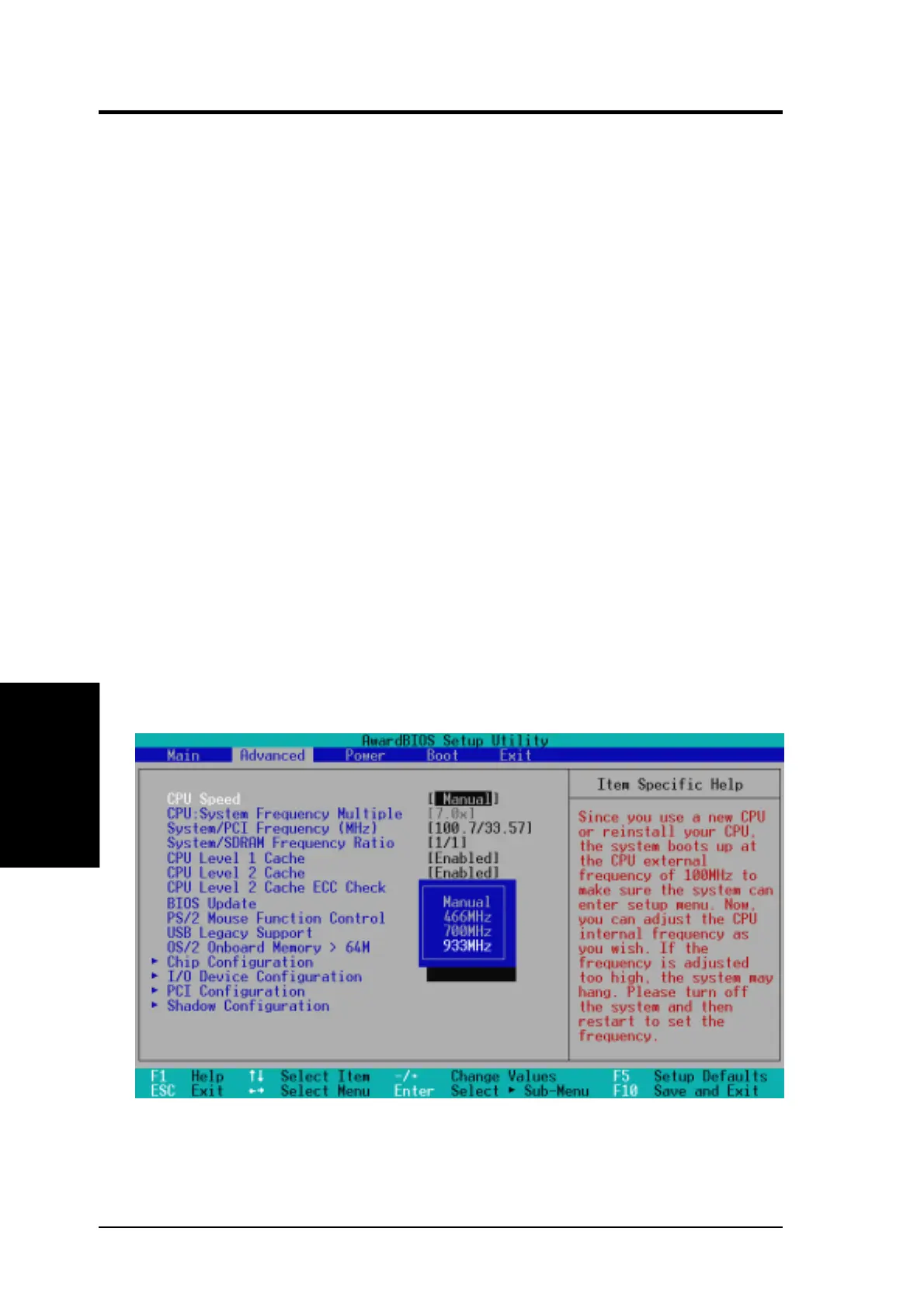
To ensure that the system can enter BIOS Setup after changing the processor,
the system starts up running at a bus speed of 66MHz and a fail-safe CPU
internal frequency (4x66MHz for the Intel Coppermine processor or
2x66MHz for non-Coppermine processors). Then it automatically takes you
to the Advanced menu with a popup menu of all the possible CPU internal
frequencies.
JumperFree Mode
For processors with locked frequency multiplier
USB Legacy Support [Auto]
This motherboard supports Universal Serial Bus (USB) devices. The default
of [Auto] allows the system to detect a USB device at startup. If detected,
the USB controller is enabled. If not detected, the USB controller is disabled.
When you set this field to [Disabled], the USB controller is disabled whether
you are using a USB device or not. Configuration options: [Disabled]
[Enabled] [Auto]
OS/2 Onboard Memory > 64M [Disabled]
When using OS/2 operating systems with installed DRAM of greater than
64MB, you need to set this option to [Enabled]. Otherwise, leave to the
default setting [Disabled]. Configuration options: [Disabled] [Enabled]


 To Next Page