18
E420
IMPORTANT!
• WestronglyrecommendthatyouuseonlytheACpowercord
that came with your PC.
• Westronglyrecommendthatyouuseagroundedwallsocket
while using your PC.
• ThesocketoutletmustbeeasilyaccessibleandnearyourPC.
• TodisconnectyourPCfromitsmainpowersupply,unplugyour
PC from the power socket.
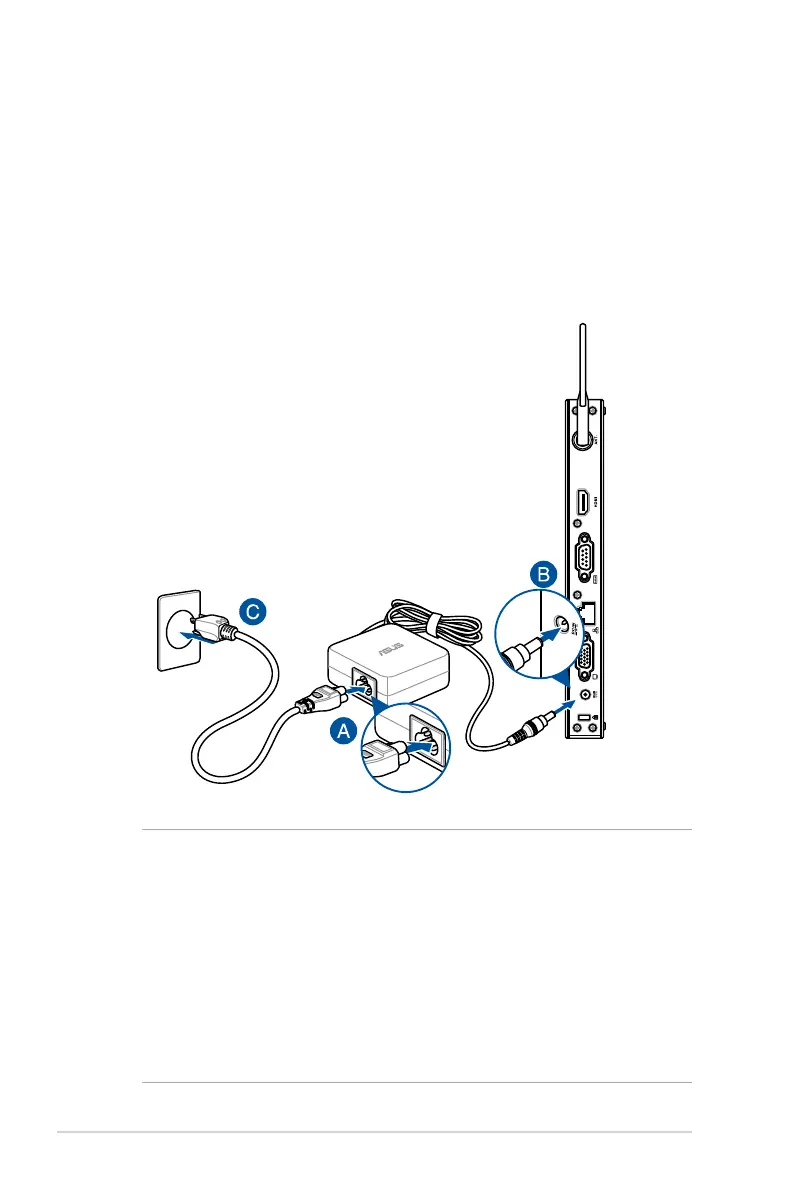
Connect the AC power adapter to your PC
To connect the AC power adapter to your PC:
A. Connect the power cord to the AC power adapter.
B. Connect the DC power connector into your PC’s power (DC)
input.
C. Plug the AC power adapter into a 100V~240V power source.


 To Next Page