28
E420
Upgrading memory modules
Your PC comes with a SO-DIMM memory slot that allow you to
install a DDR4.
IMPORTANT! Refer to http://www.asus.com for the list of compatible
DIMMs. You can only install a DDR4 to the PC’s DIMM slot.
To install or upgrade the memory modules:
1. Follow steps 1-5 under the Installing 2.5” hard disk drive / solid
state drive section to remove the side cover of your PC.
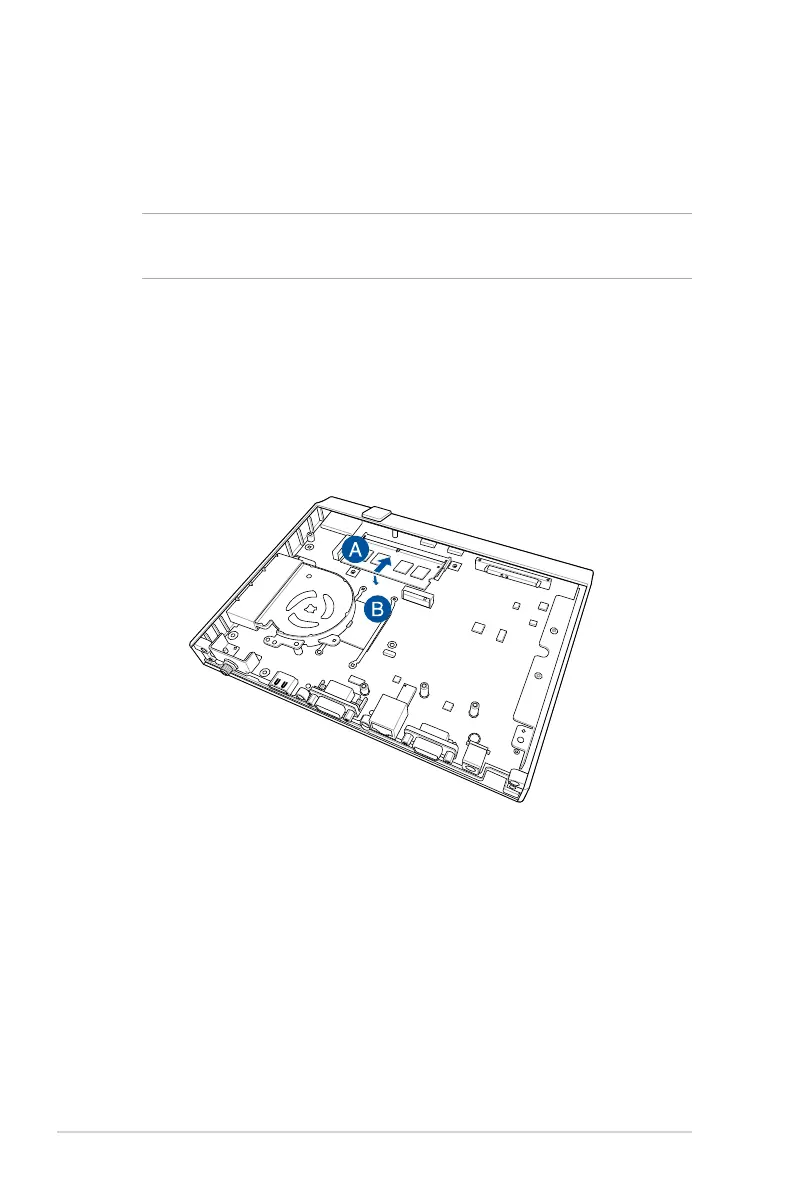
2. Align and insert the memory module into the slot (A) and press
it down (B) until it is securely seated in place.
3. Follow step 10 under the Installing 2.5” hard disk drive / solid
state drive section to replace the side cover of your PC.


 To Next Page