Notebook PC User Manual
39
There are two special Windows keys on the keyboard as described
below.
The key with the Windows Logo activates the Start menu
located at the bottom left of the Windows desktop.
The other key, that looks like a Windows menu with
a small pointer, activates the properties menu and is
equivalent to pressing the right mouse button on a
Windows object.
Microsoft Windows Keys
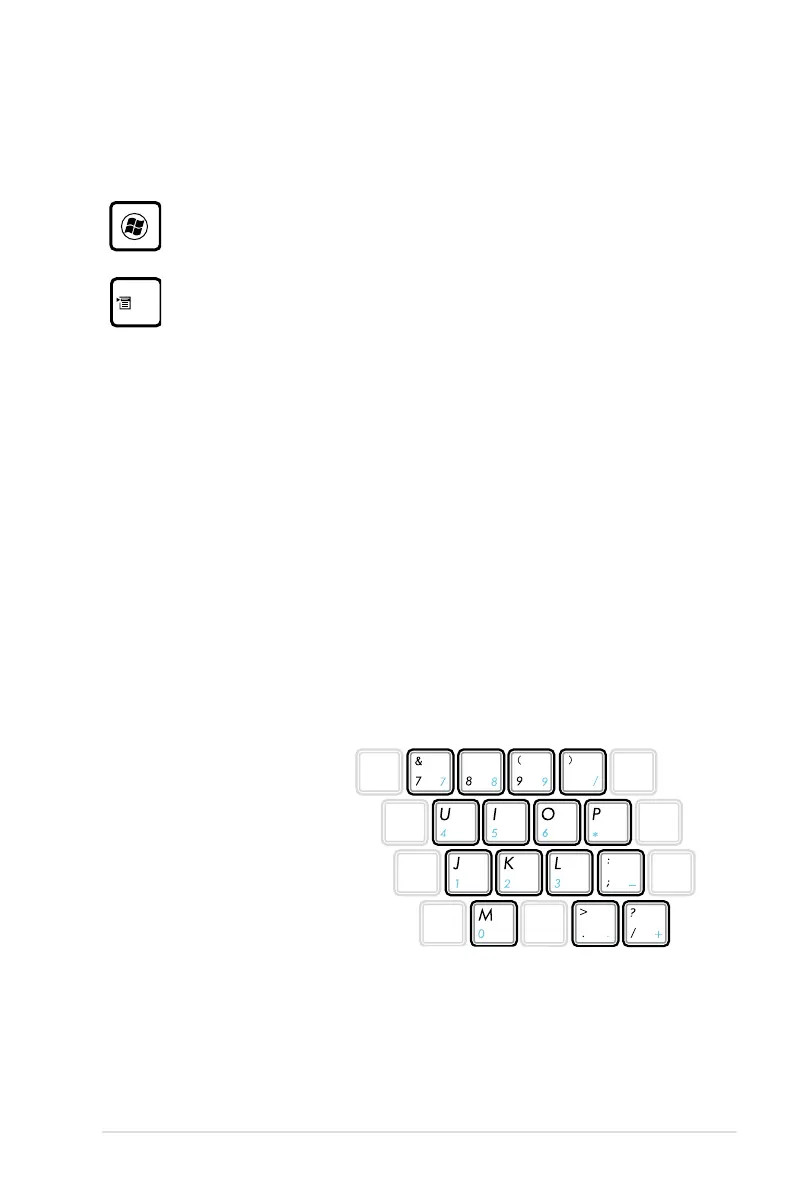
Keyboard as a Numeric Keypad (on selected
models)
The numeric keypad is embedded in the keyboard and consists
of 15 keys that make number intensive input more convenient.
These dual-purpose keys are labeled in orange on the key caps.
Numeric assignments are located at the upper right hand corner
of each key as shown in the figure. When the numeric keypad is
engaged by pressing [Fn][Ins/Num LK], the number lock LED lights
up. If an external keyboard is connected, pressing the [Ins/Num LK]
on the external keyboard enables/disables the NumLock on both
keyboards simultaneously.
To disable the numeric
keypad while keeping
the keypad on an external
keyboard activated, press the
[Fn][Ins/Num LK] keys on the
Notebook PC.



 To Next Page