ASUS Eee PC
3-5
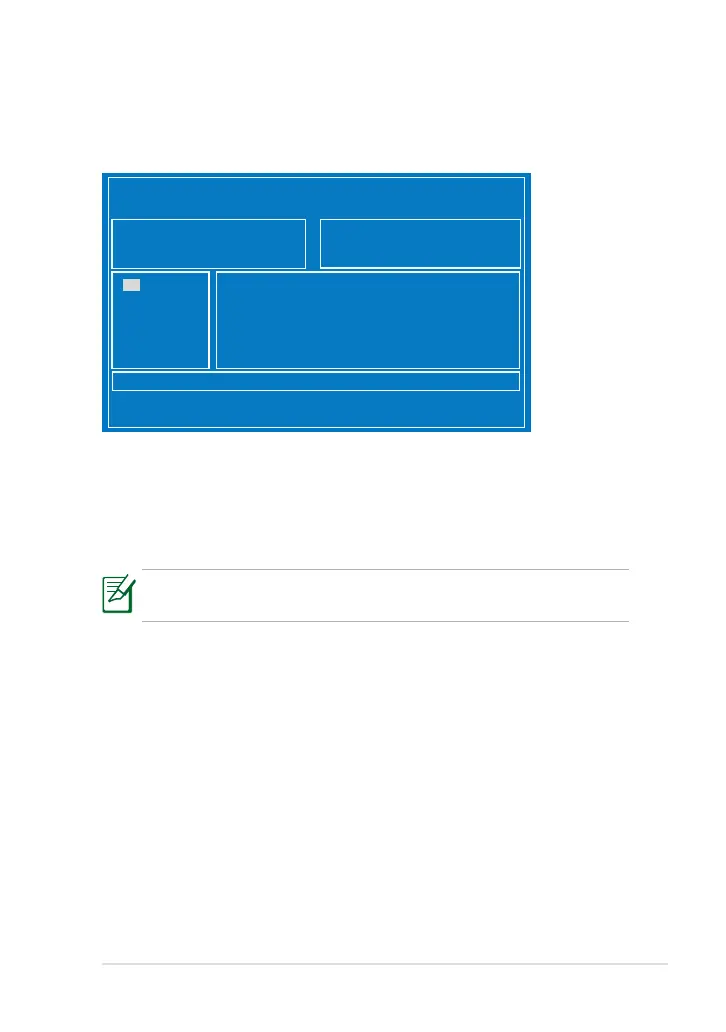
6. Press ENTER to access ASUS Tek. Easy Flash Utility.
7. Locate the latest BIOS File and start updating the BIOS.
8. You must Load Setup Defaults and then Save Changes & Reset on
the Exit page after updating the BIOS.
If you want to save the current BIOS, please use ASUS Update for
EeePC on Windows OS.
ASUS Tek. Easy Flash Utility
Current Platform
Platform: 1015
Version:
Build Date:
New Platform
Platform:
Version:
Build Date:
RECOVERY <DIR>
SOURCES <DIR>
BOOT <DIR>
[Up/ Down/ Left/ Right]: Switch [Enter]:Choose [q]: Exit
FS0
FS1
FS2













 To Next Page