Chapter 3: Using the Eee PC
3-12
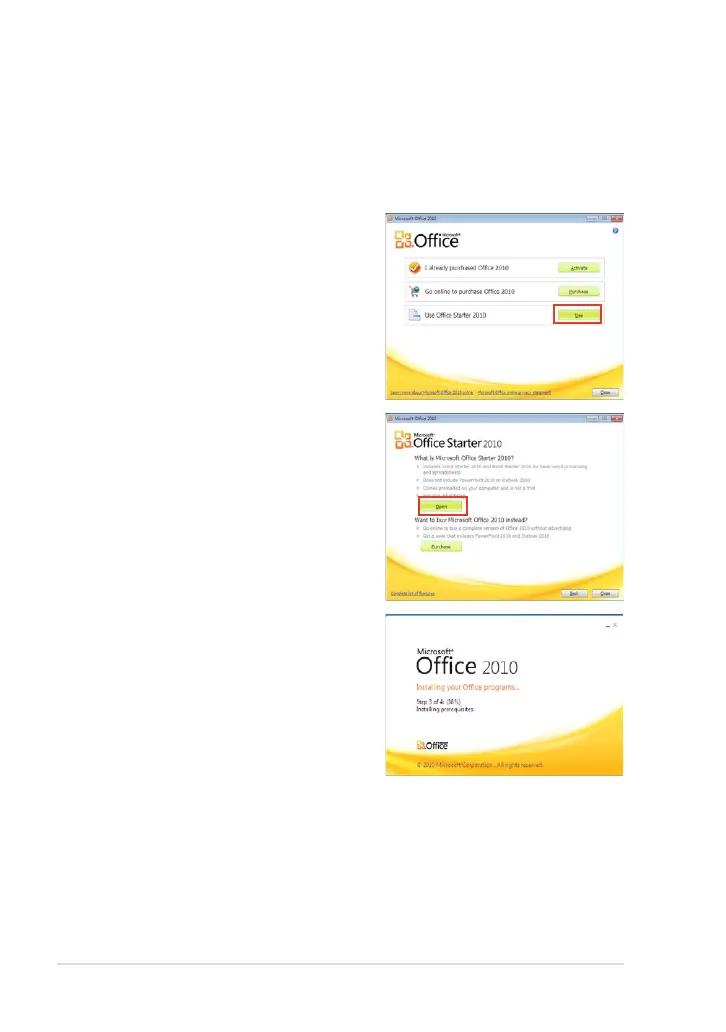
3. Click Open to continue.
Microsoft
®
Ofce Starter 2010
Eee PC users can enjoy Microsoft Office Starter 2010 that includes
Word Starter 2010 and Excel Starter 2010 for basic word processing and
spreadsheets. Do the following instructions for Office Starter 2010 first-
time start-up.
1. Click Start > All Programs >
Microsoft Office 2010.
2. In the Microsoft Office 2010
window, click Use.
4. Your Eee PC starts installing
Microsoft Office Starter 2010
programs.













 To Next Page