Chapter 3: Using the Eee PC
3-6
Bluetooth Connection
(on selected models)
This device contains FCC ID: MSQ15PNNE047 / MSQE15NE785 /
MSQE15NE762 and IC ID: 3568A-15PNNE047 / 3568A-E15NE762.
Bluetooth technology eliminates the need for cables for connecting
Bluetooth-enabled devices. Examples of Bluetooth-enabled devices may
be Notebook PCs, Desktop PCs, mobile phones, and PDAs.
To connect to a Bluetooth-enabled device:
1. Press <Fn> + <F2> repeatedly until Bluetooth ON or WLAN &
Bluetooth ON is shown.
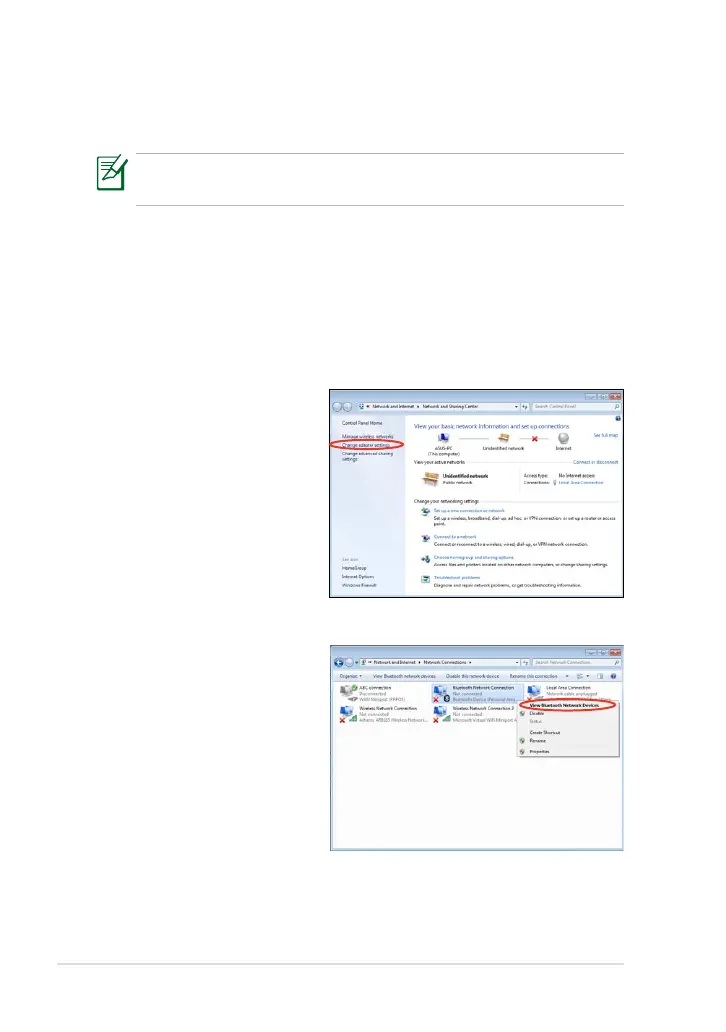
2. From Control Panel, go
to Network and Internet
> Network and Sharing
Center and then click
Change adapter settings
in the left blue pane.
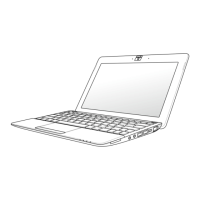
3. Right-click Bluetooth
Network Connection
and select View
Bluetooth Network
Devices.













 To Next Page