Disassembly procedure
2 - 4
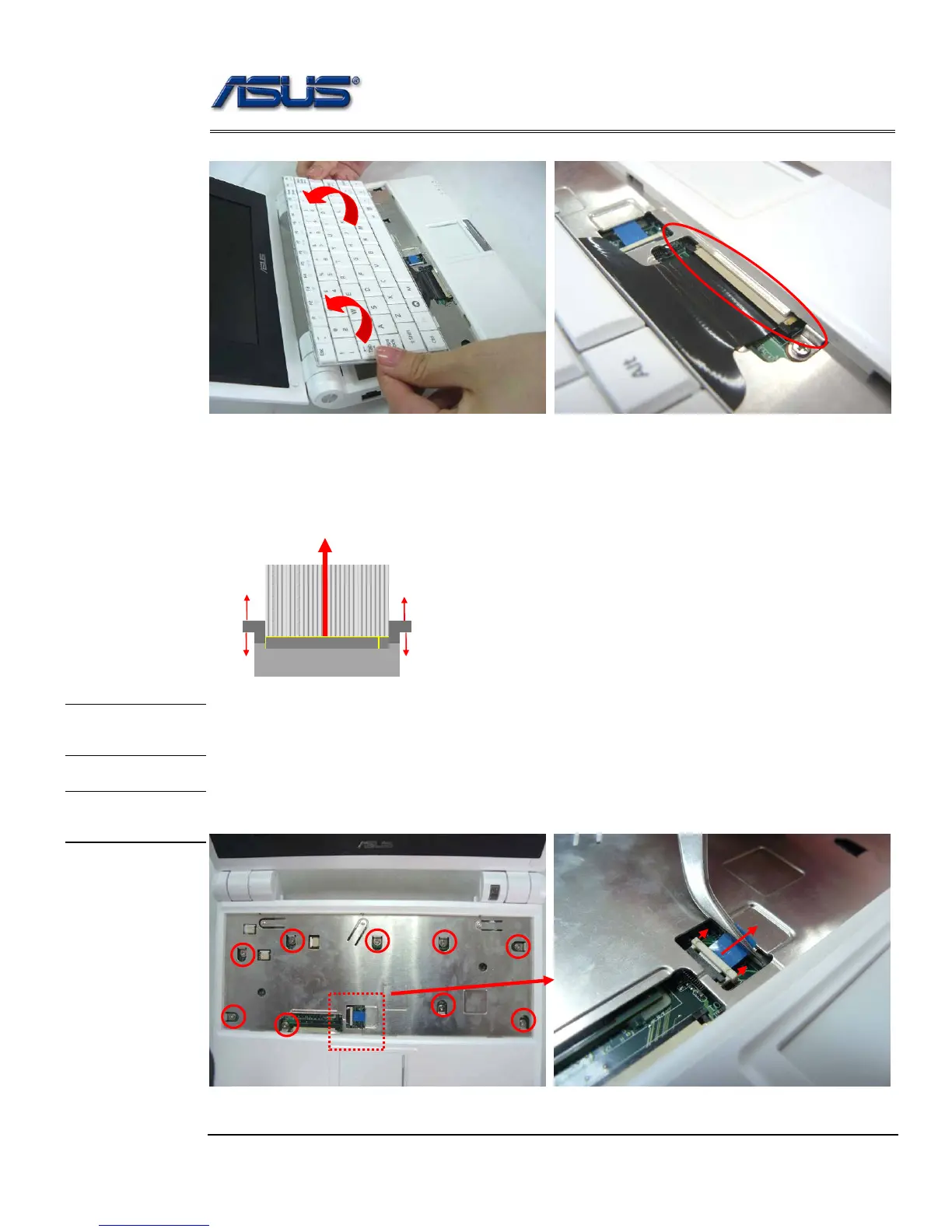
2. Place the keyboard plate on the top case and disconnect the keyboard FPC to remove.
Removing Keyboard Cable
1. Use a flexible connector tool to unlock the cable connector on both ends (no. 1).
2. Carefully pull out the keyboard cable (no. 2) with a pair of tweezers.
3. Lock the connector (no. 3) again to avoid possible breakage.
Top Case Module
The illustrations below show how to disassemble and remove the top case module of the Eee PC
4G (701). The module contains the top case itself.
Removing Top Case Module
1. Disconnect the touch pad FPC and then remove 9 screws (M2*4) on top case.
1. Unlock
2. Cable out
3.
1. Unlock
3.
TOP CASE
REMOVAL
TOP CASE
MODULE











 To Next Page