ASUS F2A85-M PRO
4-17
Chapter 4
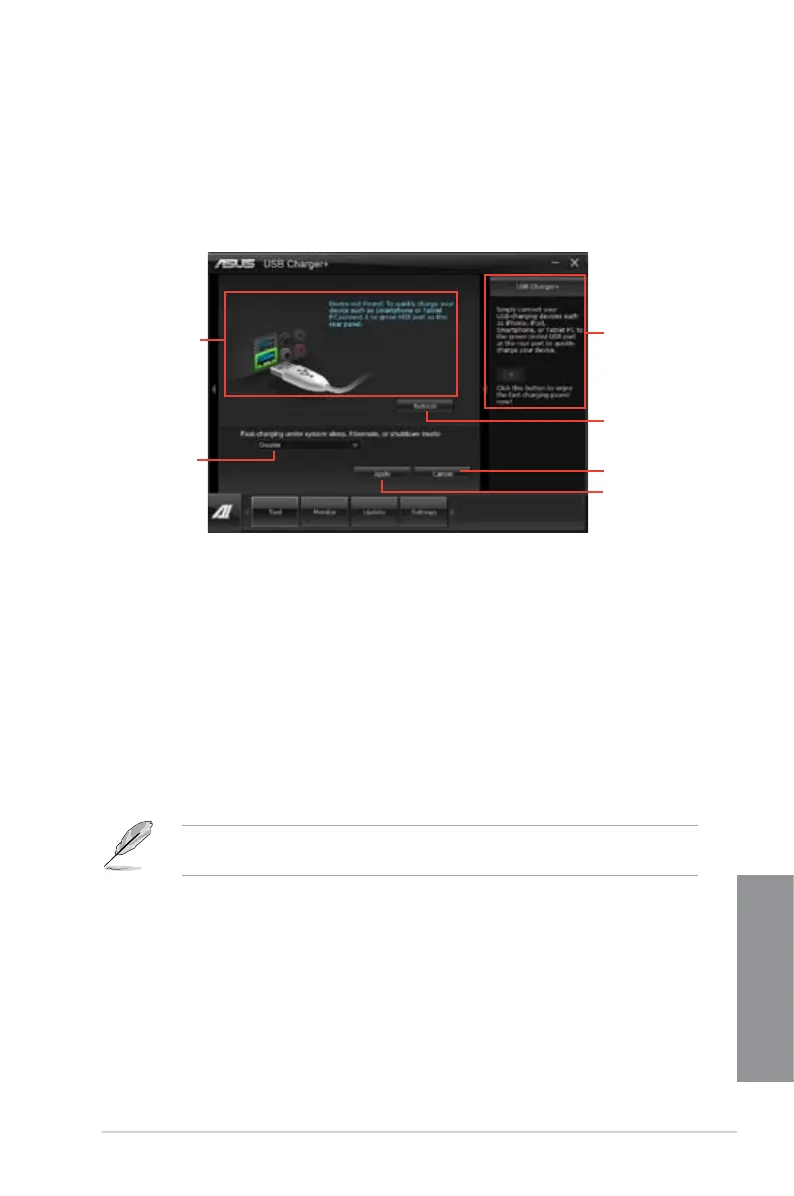
USB fast-charging mode settings
Click the dropdown box, and select a proper charge mode when your PC is off, in Sleep
Mode, or Hibernate Mode.
Disable: disables the USB fast-charging function.
ASUS: fast-charges your connected ASUS devices.
Apple: fast-charges your connected Apple devices.
Kindle: fast-charges your Kindle devices.
Others: charges other portable USB devices.
The utility cannot detect the devices connected to your computer if the charging mode is
enabled.
•
•
•
•
•
4.3.6 USB Charger+
This utility allows you to fast-charge your portable USB devices even if your PC is off, in
Sleep Mode, or Hibernate Mode.
Launching the USB Charger+
To launch this utility, open the AI Suite II, then click Tool > USB Charger+.
Application aids
Click to detect the
currently connected
device
Click to discard the
settings
Click to apply the
settings
Click to choose the
USB fast-charging
mode settings
Displays the status
of the connected
device*
* The illustration above shows that there is no device connected to your
PC for fast-charging.



 To Next Page