Rear
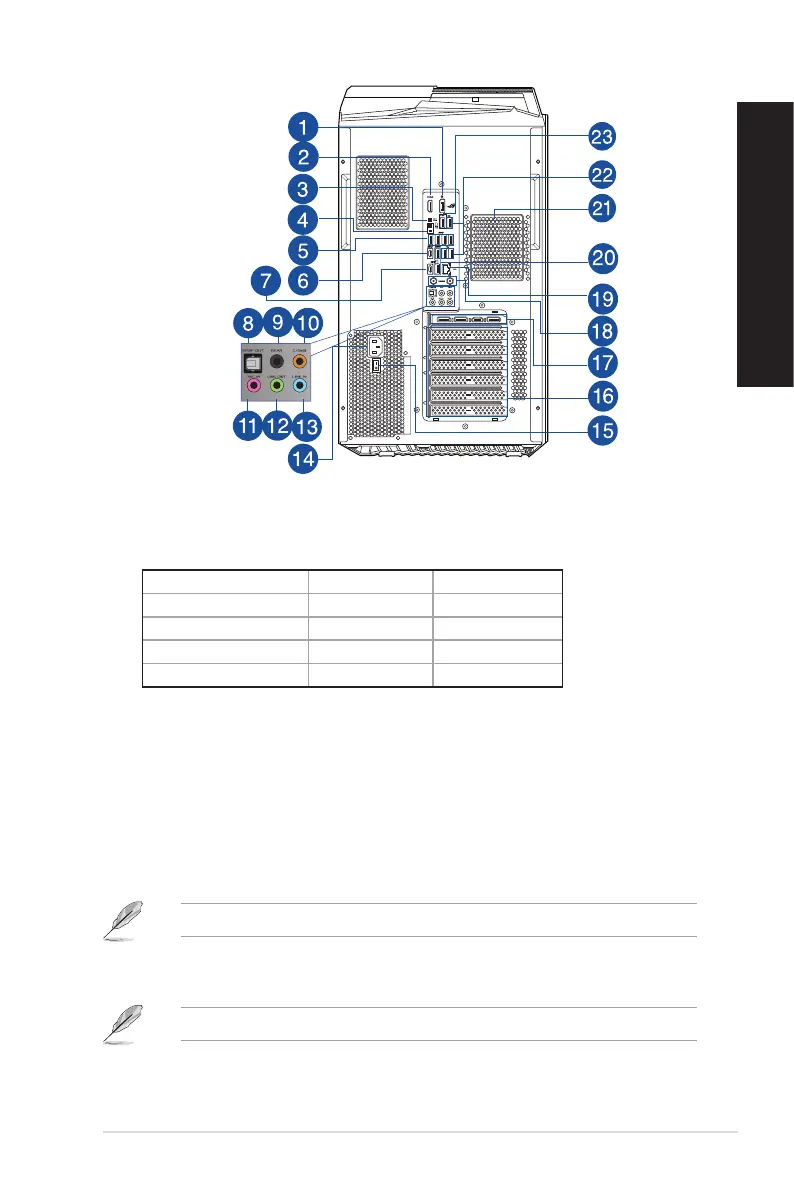
1. DisplayPort. This port is for a DisplayPort-compatible device.
2. HDMI® port. This port is for a High-Denition Multimedia Interface (HDMI®) connector, and is
HDCP compliant allowing playback of HD DVD, Blu-ray, and other protected content.
DisplayPort HDMI
®
Intel® Core™ i9-13900KF Not supported Not supported
Intel® Core™ i7-13700KF Not Supported Not Supported
Intel® Core™ i7-13700F Not Supported Not Supported
Intel® Core™ i7-13700 Supported Supported
3. Clear CMOS button. Press this button to clear the BIOS setup information only when the
system hangs due to overclocking.
4. BIOS FlashBack
TM
button. Press the BIOS FlashBack
TM
button for three seconds until the
BIOS FlashBack
TM
LED blinks three times, indicating that the BIOS FlashBack
TM
function is
enabled.
5. USB 3.2 gen1 ports. The Universal Serial Bus 3.2 gen1 (USB 3.2 gen1) ports connect to USB
3.2 gen1 devices such as a mouse, printer, scanner, camera, PDA, and others.
6. USB 3.2 gen2x2 Type-C® port. The Universal Serial Bus 3.2 gen2x2 (USB 3.2 gen2x2) Type-C®
port connects to USB 3.2 gen2x2 Type-C® devices.
The output voltage of the USB 3.2 gen2x2 Type-C® port is 5V, 3A.
7. USB 3.2 gen2 Type-C® port. The Universal Serial Bus 3.2 gen2 (USB 3.2 gen2) Type-C® port
connects to USB 3.2 gen2 Type-C® devices.
The output voltage of the USB 3.2 gen2 Type-C® port is 5V, 3A.
ASUS Desktop PC 17
ENGLISH
ENGLISH


 To Next Page