Rear
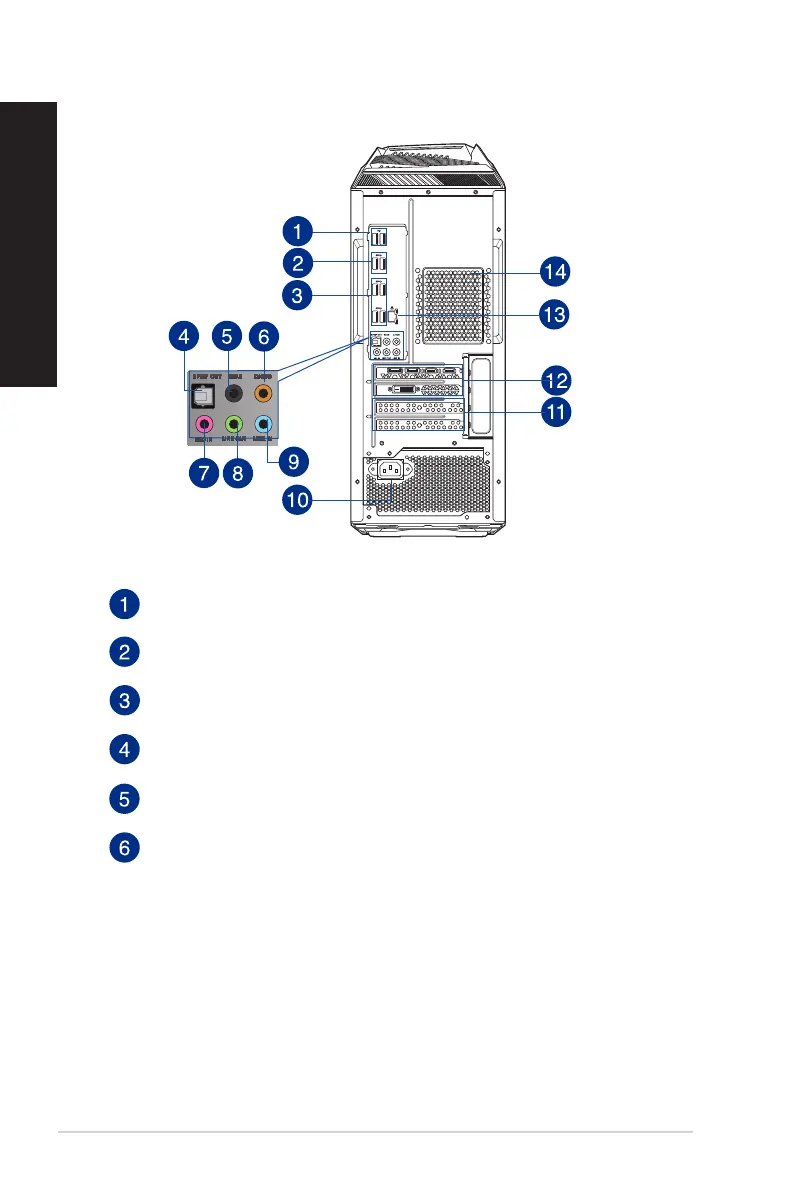
USB 2.0 ports. These Universal Serial Bus 2.0 (USB 2.0) ports connect to USB 2.0 devices
such as a mouse, printer, scanner, camera, PDA, and others.
USB 3.1 gen2 ports. The Universal Serial Bus 3.1 gen2 (USB 3.1 gen2) ports connect to
USB 3.1 gen2 devices such as a mouse, printer, scanner, camera, PDA, and others.
USB 3.1 gen1 Type A ports. These 9-pin The Universal Serial Bus 3.1 gen1 Type A ports
are for USB 3.1 gen1 devices.
Optical S/PDIF Out port. This port connects to the optical S/PDIF devices.
Rear Speaker Out port (black). This port connects to the rear speakers in a 4, 6, and
8-channel audio configuration.
Center/Subwoofer port (orange). This port connects to the center/subwoofer
speakers.
16 Chapter 1: Getting started
ENGLISH
ENGLISH


 To Next Page