6
ASUS FlexSave User Guide
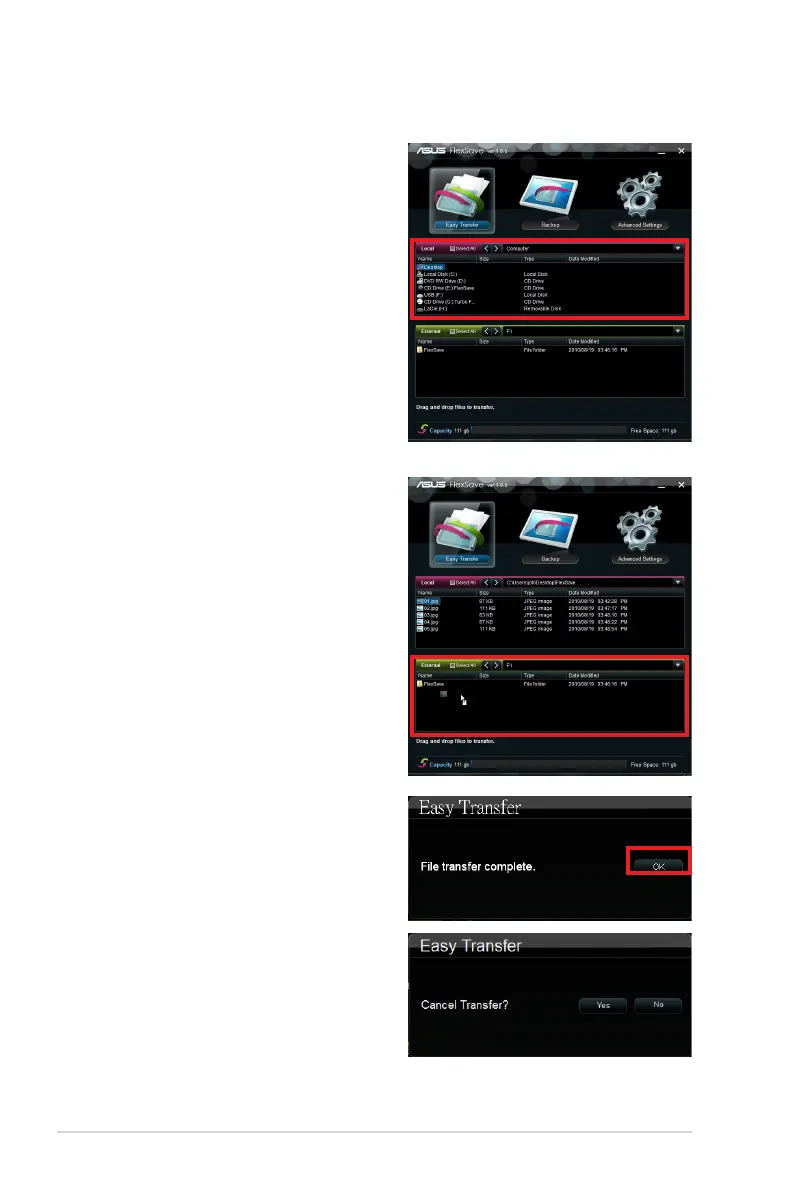
Easy Transfer
1. Connect the external hard drive to the
USB port and launch FlexSave. The
application will be minimized to the
system tray. Double-click the FlexSave
icon to open the FlexSave main screen.
2. The Easy Transfer screen will be
displayed once FlexSave is launched.
3. Locate the le(s) you would like to
backup in the Local eld.
4. Click and drag the le(s) you would like
to backup to the External eld. The
le(s) will start to transfer.
5. A File transfer complete dialog box
appears after le transfer completes.
Click OK.
6. You may click Cancel to stop the
transfer at anytime. Click Yes to conrm
cancellation or No to continue le
transfer. An Easy Transfer cancelled
dialog box appears if you cancel le
transfer. Click OK to return to the
FlexSave main screen.


 To Next Page