8
ASUS FlexSave User Guide
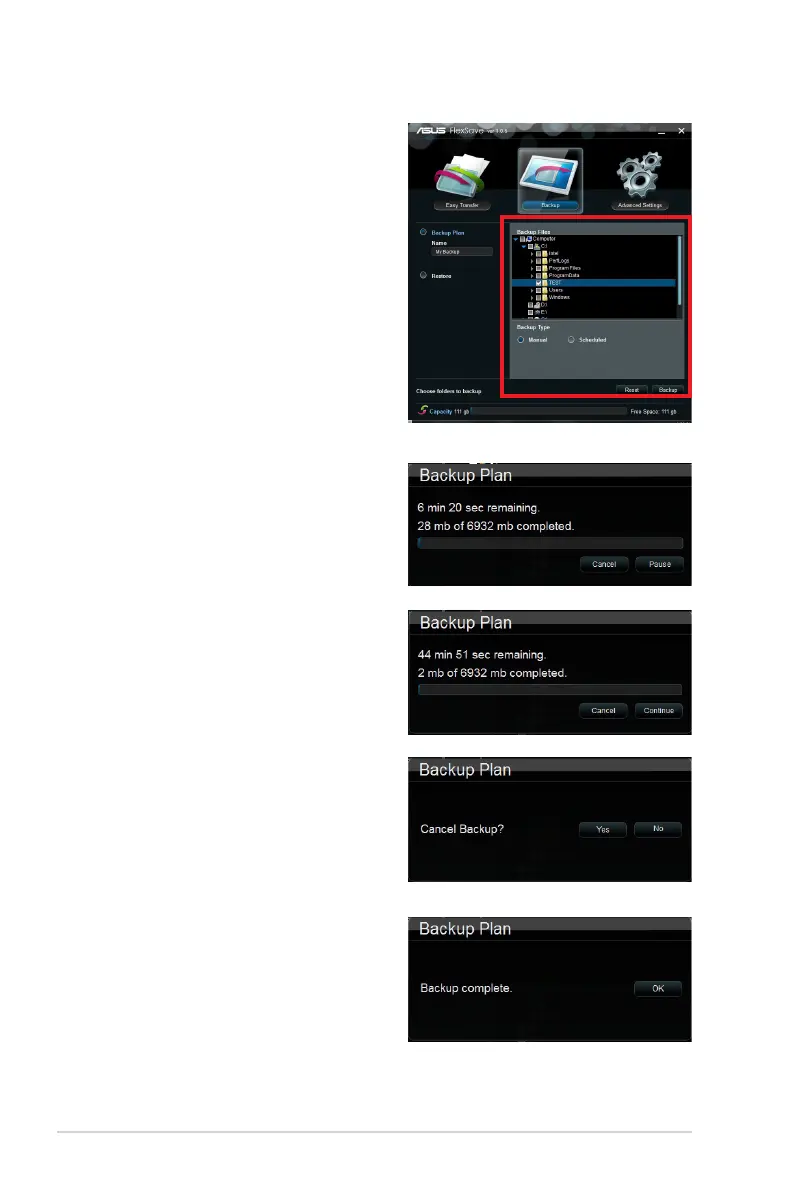
4. Select the folder(s) or le(s) to backup.
You may select the root folder to select
all les within the drive, or click Reset to
cancel selection.
5. After selection, choose a Backup Type
between Manual (continue to step 6)
and Scheduled (skip to step 11).
6. If you choose Manual in step 5, click
Backup below to start le backup.
7. You may cancel or pause le backup.
8. If you pause le backup, click Continue
to continue the backup plan.
9. To stop le backup, click Cancel. A
conrmation box appears. Click Yes
to cancel le backup, or click No to
continue le backup.
10. A Backup complete dialog box appears
after le backup completes. Click OK to
return to the Backup main screen.


 To Next Page