ASUS M2A-VM HDMI 1-23
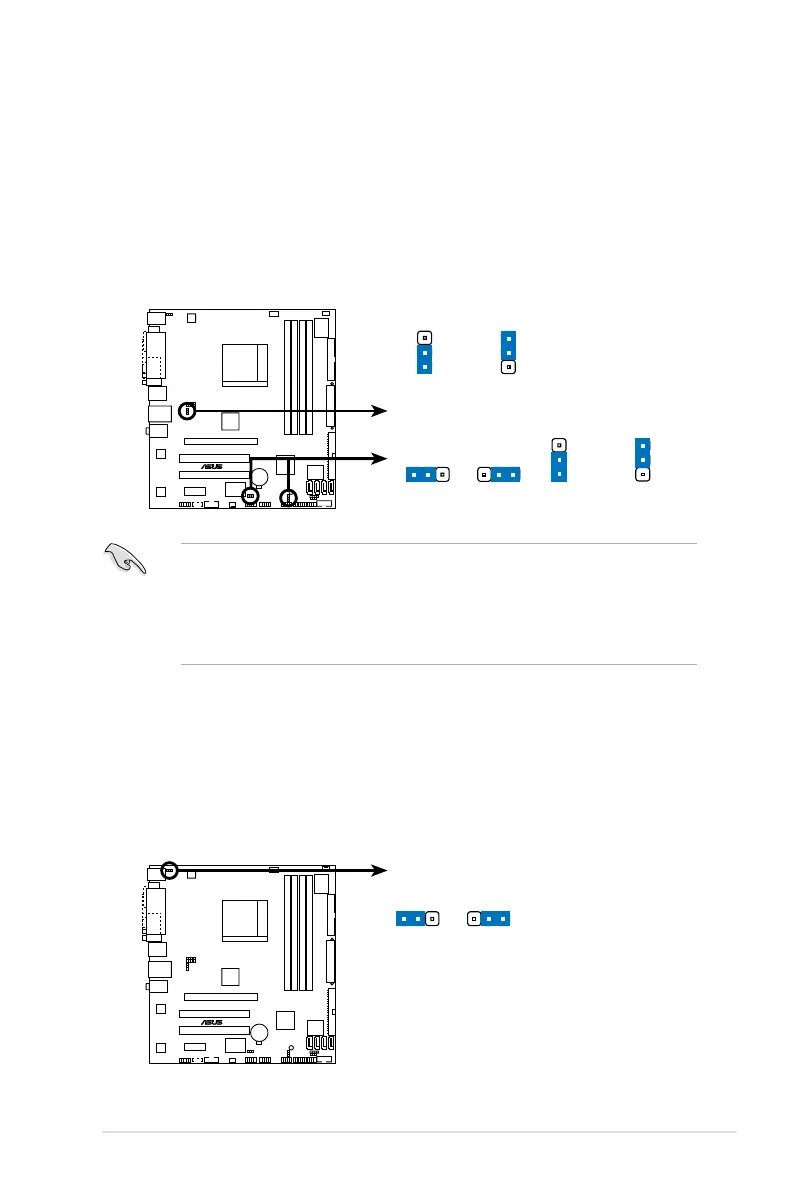
2. USB device wake-up (3-pin USBPW1-4, USBPW5-8, USBPW910)
Set these jumpers to +5V to wake up the computer from S1 sleep mode
(CPU stopped, DRAM refreshed, system running in low power mode) using
the connected USB devices. Set to +5VSB to wake up from S3 and S4 sleep
modes.
The USBPW1-4 jumpers are for the rear USB ports. The USBPW5-8 and
USBPW910 jumpers are for the internal USB connectors that you can
connect to additional USB ports.
• The USB device wake-up feature requires a power supply that can
provide 500mA on the +5VSB lead for each USB port; otherwise,
the system will not power up.
• The total current consumed must NOT exceed the power supply
capability (+5VSB) whether under normal condition or in sleep mode.
M2A-VM HDMI USB device wake-up
1
2
2
3
+5V
(Default)
+5VSB
USBPW1-4
USBPW5-8
+5V
(Default)
+5VSB
1
2
2
3
+5V
(Default)
+5VSB
USBPW910
3. Keyboard power (3-pin KBPWR)
This jumper allows you to enable or disable the keyboard wake-up feature.
Set this jumper to pins 2-3 (+5VSB) to wake up the computer when you press
a key on the keyboard (the default is the Space Bar). This feature requires an
ATX power supply that can supply at least 500 mA on the +5VSB lead, and a
corresponding setting in the BIOS.
M2A-VM HDMI Keyboard power setting
KBPWR
+5V
(Default)
+5VSB




 To Next Page