ASUS M2A-VM HDMI 2-33
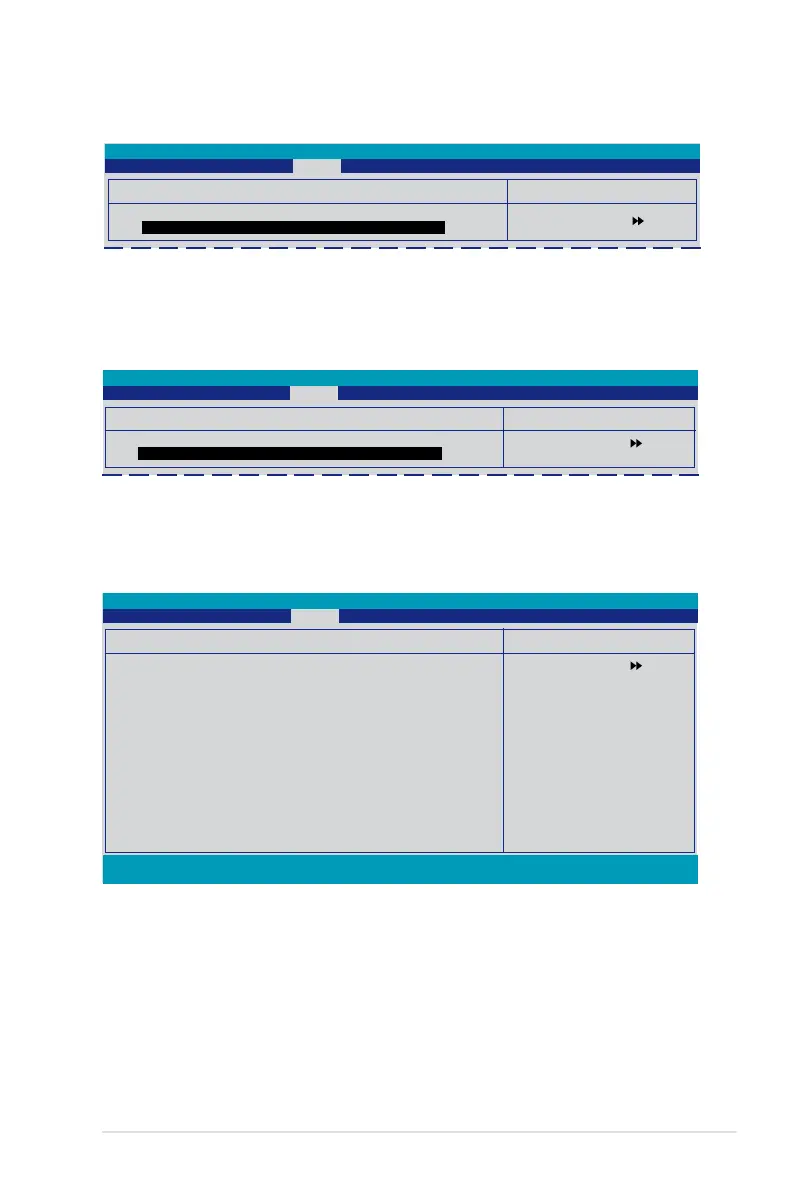
2.6.4 CDROM Drives
Select Menu
Item Specic Help
Phoenix-Award BIOS CMOS Setup Utility
Boot
1. 2nd Slave: XXXXXXXXX
Allows you to assign CDROM drives attached to the system.
Select Menu
Item Specic Help
1. SATA
Allows you to assign a hard disk drive attached to the system.
2.6.3 Hard Disk Drives
Hard Disk Drives
1. SATA: XXXXXXXXX
Phoenix-Award BIOS CMOS Setup Utility
Boot
2.6.5 Boot Settings Conguration
F1:Help ↑↓ : Select Item -/+: Change Value F5: Setup Defaults
ESC: Exit →←: Select Menu Enter: Select SubMenu F10: Save and Exit
Boot Settings Conguration
Case Open Warning [Enabled]
Quick Boot [Enabled]
Boot Up Floppy Seek [Disabled]
Bootup Num-Lock [On]
Typematic Rate Setting [Disabled]
x Typematic Rate (Chars/Sec) 6
x Typematic Delay (Msec) 250
OS Select For DRAM > 64MB [Non-OS2]
Full Screen LOGO [Enabled]
Halt On [All, But keyboard]
Phoenix-Award BIOS CMOS Setup Utility
Boot
Case Open Warning [Enabled]
Enables or disables the chassis open status feature. Setting to Enabled, clears
the chassis open status. Refer to section “1.10.2 Internal connectors” for setting
details. Conguration options: [Disabled] [Enabled]
Quick Boot [Enabled]
Allows you to enable or disable the system quick boot feature. When Enabled, the
system skips certain tests while booting.
Conguration options: [Disabled] [Enabled]
Select Menu
Item Specic Help
Press [Enter] to
enable or disable.
CDROM Drives
1. 2nd Slave: XXXXXXXXX
Select Menu
Item Specic Help




 To Next Page