2-28 Chapter 2: Hardware information
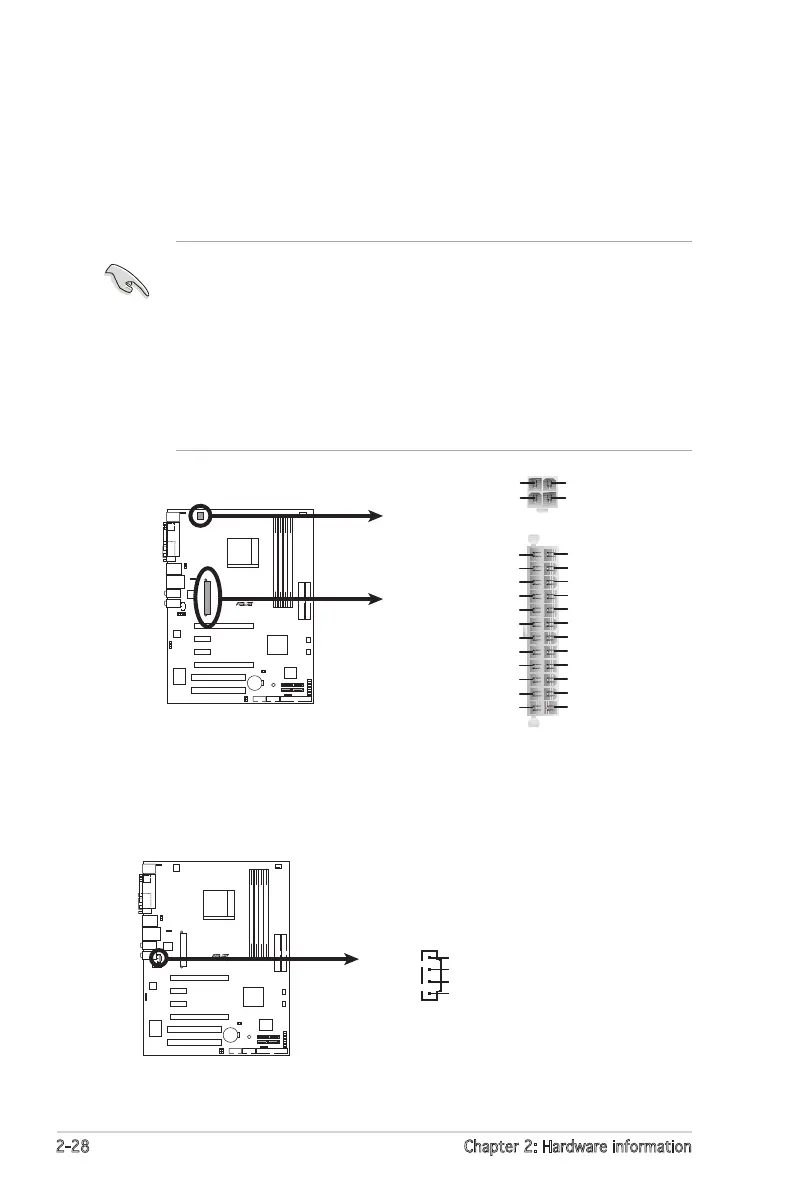
6. ATX power connectors (24-pin EATXPWR1,4-pin ATX12V)
These connectors are for an ATX power supply plugs. The power
supply plugs are designed to t these connectors in only one
orientation. Find the proper orientation and push down rmly until the
connectors completely t.
•
Do not forget to connect the 4-pin ATX +12 V power plug;
otherwise, the system will not boot.
• Use of a PSU with a higher power output is recommended when
conguring a system with more power-consuming devices. The
system may become unstable or may not boot up if the power is
inadequate.
• Make sure that your power supply unit (PSU) can provide at least
the minimum power required by your system. See the table below
for details.
7. Internal audio connectors (4-pin CD)
These connectors allow you to receive stereo audio input from sound
sources such as a CD-ROM, TV-tuner, or MPEG card.









 To Next Page