ASUS M2N-E SLI 2-25
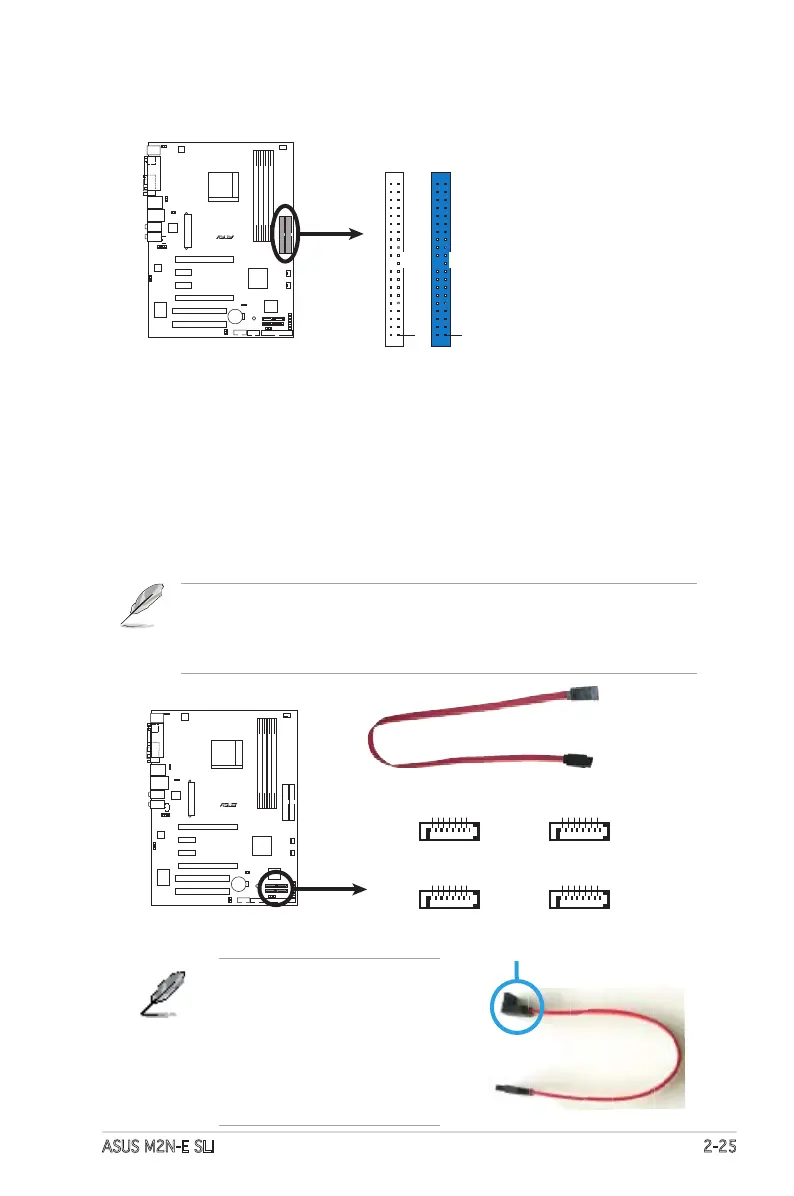
3. Serial ATA connectors
(7-pin SATA1, SATA2, SATA3, SATA4)
These connectors are for the Serial ATA signal cables for Serial ATA
3.0 Gb/s hard disk and optical disk drives. The Serial ATA 3.0 Gb/s is
backward compatible with Serial ATA 1.5 Gb/s specication.
If you installed Serial ATA hard disk drives, you can create a RAID 0,
RAID 1, RAID 0+1, RAID 5, or JBOD conguration through the onboard
NVIDIA
®
MediaShield™ controller.
The RAID function of these connectors is set to [Disabled] by default.
If you intend to create a Serial ATA RAID set using these connectors,
enable the RAID Enabled item in the SATA Conguration sub-menu in the
BIOS. See section “4.4.7 Onboard Device Conguration” for details.
Connect the right-angle side
of the SATA signal cable to
the SATA device or you may
connect the right-angle side
of the SATA cable to the
onboard SATA port to avoid
placement conict with huge
graphics cards.
right angle side
R
M2N-E SLI
M2N-E SLI
IDE Connectors
NOTE: Orient the red markings
(usually zigzag) on the ID
ribbon cable to PIN 1.
PRI_IDE
PIN1
SEC_IDE
PIN1
R
M2N-E SLI
M2N-E SLI
SATA Connectors
GND
RSATA_TXP3
RSATA_TXN3
GND
RSATA_RXP3
RSATA_RXN3
GND
SATA3
GND
RSATA_TXP4
RSATA_TXN4
GND
RSATA_RXP4
RSATA_RXN4
GND
SATA4
GND
RSATA_TXP1
RSATA_TXN1
GND
RSATA_RXP1
RSATA_RXN1
GND
SATA1
GND
RSATA_TXP2
RSATA_TXN2
GND
RSATA_RXP2
RSATA_RXN2
GND
SATA2









 To Next Page