ASUS M2N-E SLI 4-3
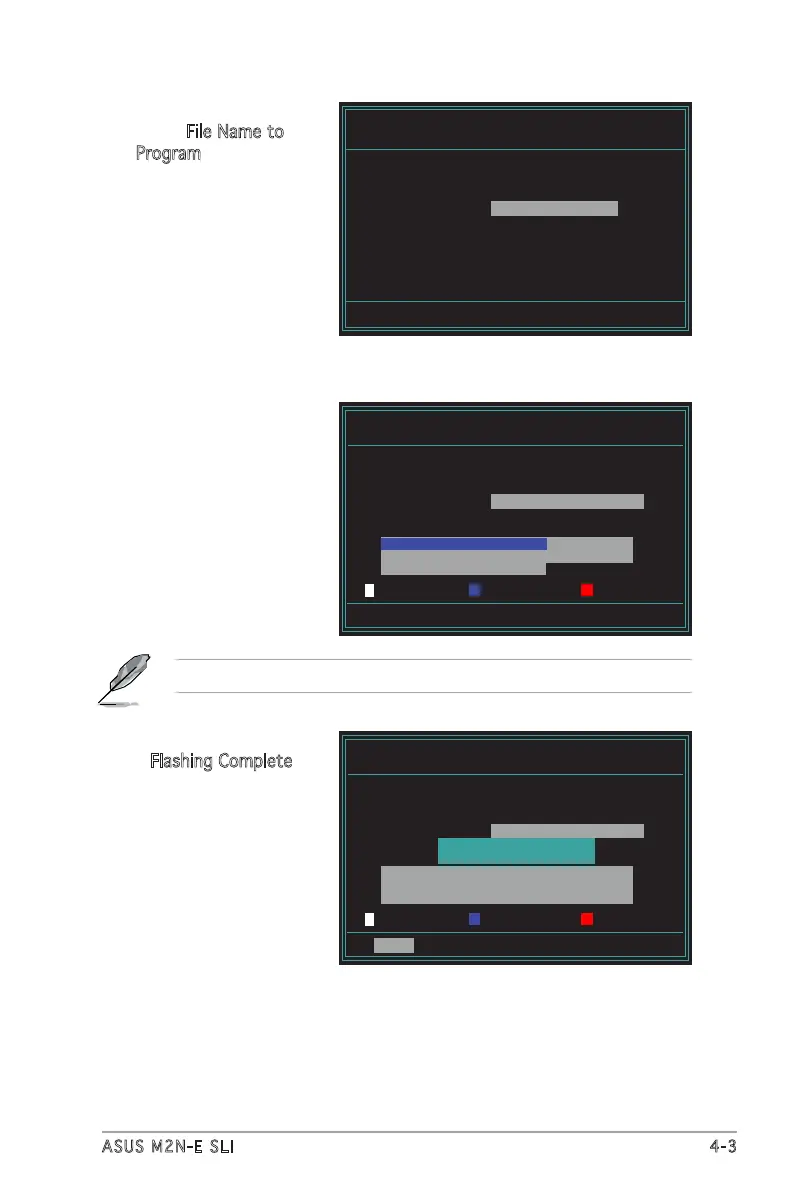
6. Type the BIOS le name
in the File Name to
Program eld, then press
<Enter>.
7. Press <N> when the utility prompts you to save the current BIOS le.
The following screen appears.
Do not turn off or reset the system during the ashing process!
AwardBIOS Flash Utility for ASUS V1.01
(C) Phoenix Technologies Ltd. All Rights Reserved
For NF-CK804-M2N-E SLI DATE: 11/18/2004
Flash Type - SST 49LF004A/B /3.3V
File Name to Program: m2nesli.bin
AwardBIOS Flash Utility for ASUS V1.01
(C) Phoenix Technologies Ltd. All Rights Reserved
Warning: Don’t Turn Off Power Or Reset System!
For NF-CK804-M2N-E SLI DATE: 11/18/2004
Flash Type - SST 49LF004A/B /3.3V
File Name to Program: m2nesli.bin
Program Flashing Memory - OFE00 OK
Write OK No Update Write Fail
Message: Do You Want To Save Bios (Y/N)
9. The utility displays
a Flashing Complete
message indicating that
you have successfully
ashed the BIOS le.
Remove the oppy disk
then press <F1> to
restart the system.
AwardBIOS Flash Utility for ASUS V1.01
(C) Phoenix Technologies Ltd. All Rights Reserved
F1
Reset
For NF-CK804-M2N-E SLI DATE: 11/18/2004
Flash Type - SST 49LF004A/B /3.3V
File Name to Program: m2nesli.bin
Flashing Complete
Press <F1> to Continue
Write OK No Update Write Fail
8. The utility veries the
BIOS le in the oppy
disk and starts ashing
the BIOS le.









 To Next Page