1-20 Chapter 1: Product introduction
1.10 Connectors
1.10.1 Rear panel connectors
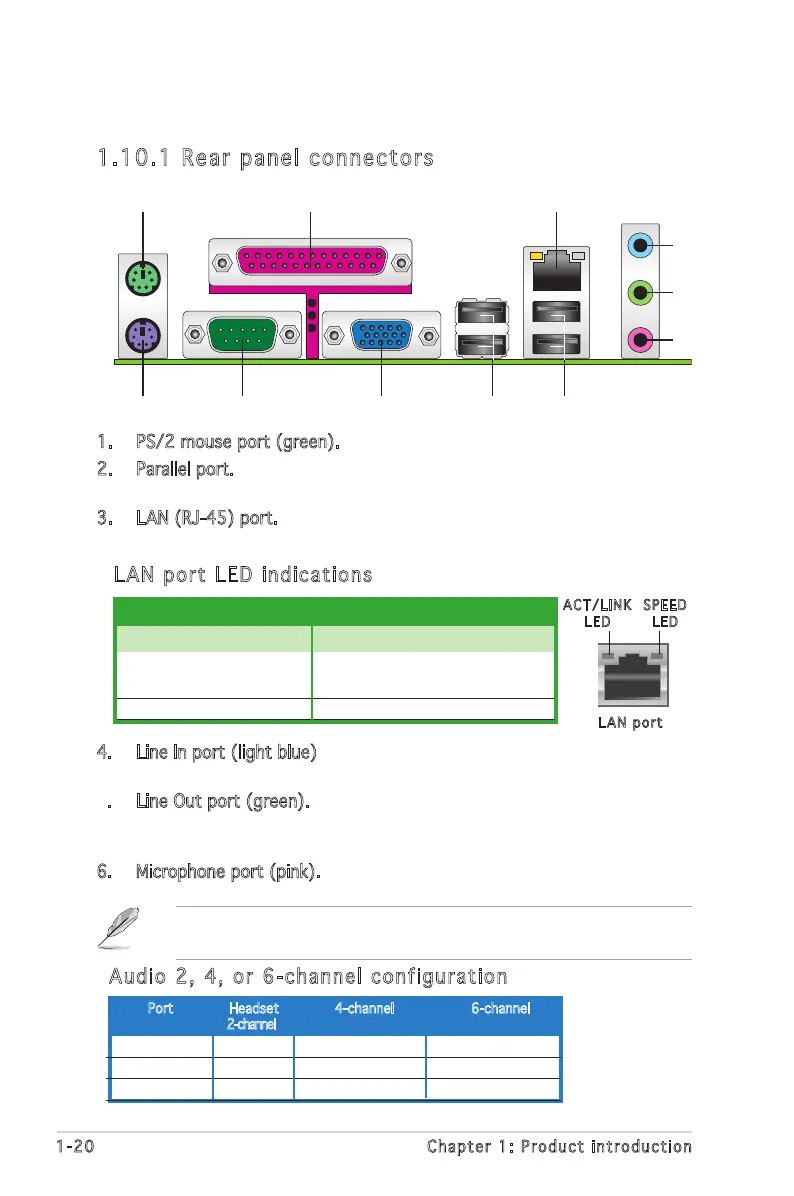
1. PS/2 mouse port (green). This port is for a PS/2 mouse.
2. Parallel port. This 25-pin port connects a printer, scanner, or other
devices.
3. LAN (RJ-45) port. This port allows Gigabit connection to a Local Area
Network (LAN) through a network hub.
LAN port LED indications
LAN port
SPEE D
LED
ACT/ LINK
LED
ACT/LINK LED SPEED LED
Status Description Status Description
OFF No link OFF 10 Mbps connection
Yellow Linked GREEN 100 Mbps connection
BLINKING Data activity
4. Line In port (light blue). This port connects a tape, CD, DVD player, or
other audio sources.
5. Line Out port (green). This port connects a headphone or a speaker.
In 4-channel, or 6-channel, conguration, the function of this port
becomes Front Speaker Out.
6. Microphone port (pink). This port connects a microphone.
Refer to the audio conguration table below for the function of the audio
ports in 2, 4, or 6-channel conguration.
Audio 2, 4, or 6-channel configuration
Light Blue Line In Surround (Rear) Surround (Rear)
Green Line Out Front Speaker Out Front Speaker Out
Pink Mic In Mic In Bass/Center
Port Headset 4-channel 6-channel
2-channel


 To Next Page