22
Notebook PC User Manual
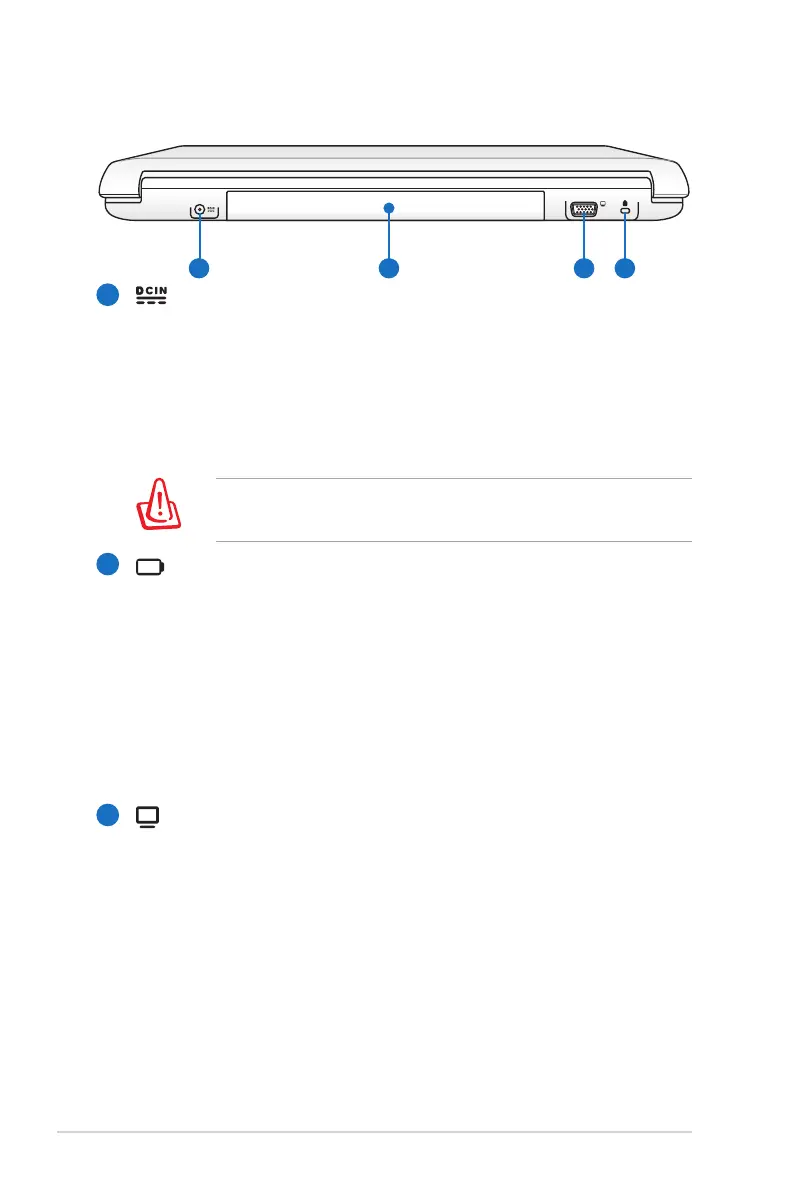
Rear Side
Power (DC) Input
The supplied power adapter converts AC power to DC
power for use with this jack. Power supplied through this
jack supplies power to the Notebook PC and charges the
internal battery pack. To prevent damage to the Notebook
PC and battery pack, always use the supplied power
adapter.
The adapter may become warm to hot when in use. Ensure
not to cover the adapter and keep it away from your body.
Battery Pack
The battery pack is automatically charged when the
Notebook PC is connected to an AC power source and
maintains power to the Notebook PC when AC power is
not connected. This allows use when moving temporarily
between locations. Battery time varies by usage and by
the specifications for this Notebook PC. The battery pack
cannot be disassembled and must be purchased as a single
unit.
Display (Monitor) Output
The 15-pin D-sub monitor port supports a standard
VGA-compatible device such as a monitor or projector to
allow viewing on a larger external display.
1
2
3


 To Next Page