Notebook PC User Manual
A-15
Software Problem - BIOS
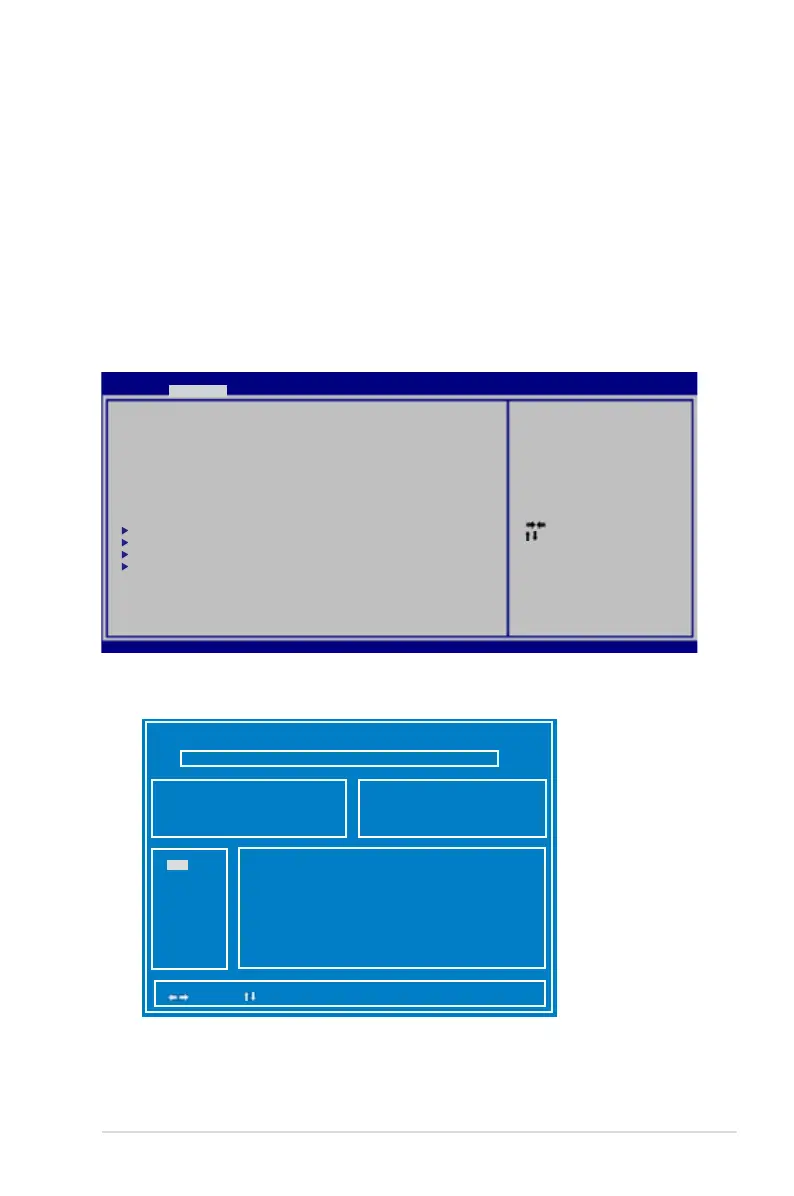
Updating the BIOS.
1. Please verify the Notebook PC’s exact model and download the
latest BIOS file for your model from the ASUS website and save it
in your flash disk drive.
2. Connect your flash disk drive to the Notebook PC and power on
the Notebook PC.
3. Use the Start Easy Flash function on the Advanced page of the
BIOS Setup Utility. Follow the instructions shown.
4. Locate the latest BIOS file and start updating (flashing) the BIOS.
ASU S Te k. E as y Fl as h Utilit y
[ ]: Sw it ch [ ] : C ho os e [q ] : Ex it
FLA SH T YP E: G en er ic Flash Typ e
C ur rent Platf or m
Pla tf or m: N 76
Ver si on : 20 0
Bui ld D at e: M ar 6 2011
N ew Platfor m
Pla tf or m: U nk ow n
Ver si on : Un ko wn
Bui ld D at e: U nk own
5. You must Restore Defaults on the Exit page after updating
(flashing) the BIOS.
: Se le ct S cr ee n
: Se le ct I te m
Ent er : Se le ct
+/— : Ch an ge O pt .
F1: G en er al He lp
F9: O pt im ized Defau lt s
F10 : Save ES C: Ex it
Ver si on 2 .0 1. 12 08 . Copyrigh t (C ) 20 11 A me rican Megatre nd s, I nc .
A pt io S et up Util ity - Copy ri gh t (C ) 20 11 Amer ican Meg at re nd s, I nc .
M ai n A dv anced Chip se t B oo t Secu rity Sa ve & E xi t
PO ST L og o Ty pe [Static]
St ar t Ea sy F la sh
Pl ay P OS T So un d [No ]
Sp ea ke r Vo lu me [4]
In te rn al P oi nt ing Device [En ab le d]
Wa ke O n Li d Op en [En ab le d]
AS US U SB C ha rg er+ in bat te ry m od e [Di sa bl ed ]
In te l Vi rt ua li zation Tec hn ol og y [Di sa bl ed ]
VT -d [En ab le d]
SA TA C on fi gu ra ti on
US B Co nf ig ur at io n
In te l( R) S ma rt C on nect Tec hn ol og y
Ne tw or k St ac k
Pr es s E NT ER t o r un t he ut ility
to se le ct a nd u pd ate BIOS.
FS0
FS1



 To Next Page