ASUS P9X79-E WS
3-25
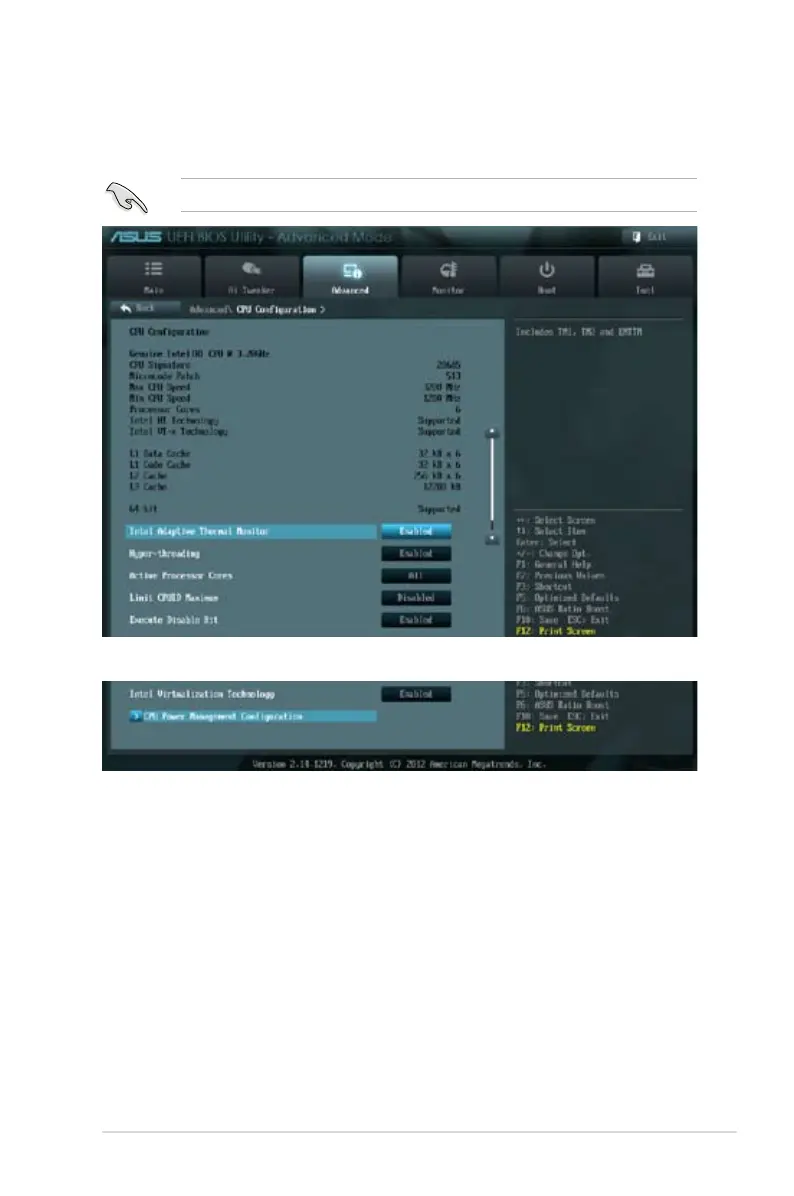
3.5.1 CPU Conguration
The items in this menu show the CPU-related information that the BIOS automatically
detects.
The items shown in this screen may be different due to the CPU you installed.
Intel Adaptive Thermal Monitor [Enabled]
This function includes TM1, TM2, and EMTTM.
[Disabled] Disables the CPU thermal monitor function.
[Enabled] Enables the overheated CPU to throttle its clock speed to cool
down.
Hyper-threading [Enabled]
The Intel Hyper-Threading Technology allows a hyper-threading processor to appear as two
logical processors to the operating system, allowing the operating system to schedule two
threads or processes simultaneously.
[Disabled] Only one thread per activated core is enabled. Disabled for other
OS (OS not optimized for Hyper-Threading Technology).
[Enabled] Two threads per activated core are enabled. Enabled for
Windows XP and Linux (OS optimized for Hyper-Threading
Technology).
Scroll down to display the following items:








 To Next Page