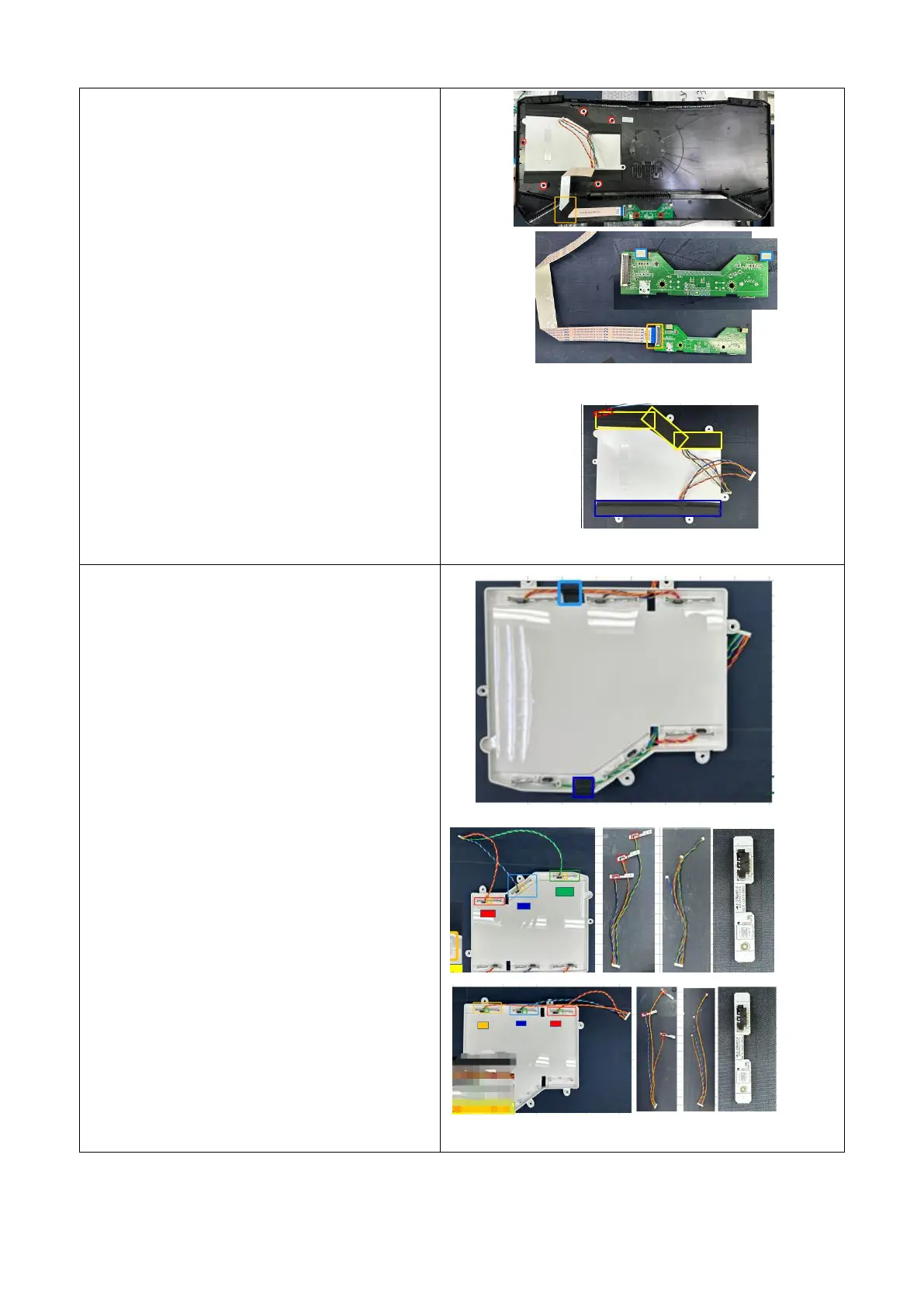
3-1.拆按键 2PCS 螺丝
3-1. Remove the key 2PCS screw
3-2.撕掉线材上面 1PCS 胶带
3-2. Remove 1 piece of adhesive tape from
the wire
3-3.拆 LED 灯罩 6PCS 螺丝
3-3. Remove 6 screws from the LED
lampshade
3-4.撕掉按键板 2PCS 导电泡棉
3-4. Tear off 2PCS conductive foam from
the button board
3-5.拔下按键 FFC 线
3-5. Unplug the button FFC cable
3-6.撕掉 LED 灯罩上 4PCS 漏光胶带
3-6.emove 4 pieces of leaking tape from
the LED lampshade
4-1.撕掉 LED 灯罩上 2PCS 固定线材胶带
4-1 .emove the 2PCS fixed wire tape from
the LED lampshade
4-2.拆 LED 灯-6PCS,拔下 LED 灯线
4-2.Remove the LED light -6PCS and
unplug the LED light cable











 To Next Page