1-4
Chapter 1: Product introduction
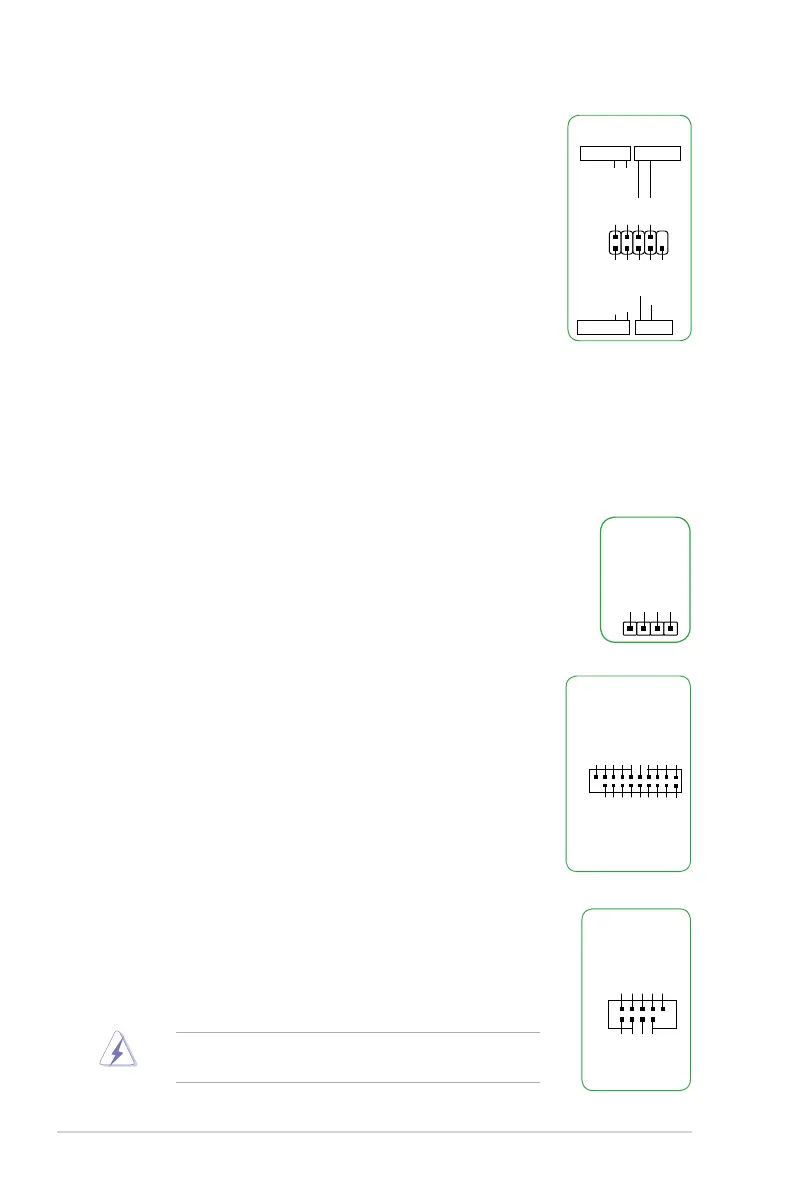
10. USB 2.0 connectors (10-1 pin USB3~6)
TheseconnectorsareforUSB2.0ports.ConnecttheUSBmodule
cabletoanyoftheseconnector,theninstallthemoduletoaslot
openingatthebackofthesystemchassis.TheseUSBconnectors
complywithUSB2.0specicationsandsupportsupto480Mbps
connection speed.
Neverconnecta1394cabletotheUSBconnectors.Doingso
will damage the motherboard!
USB+5V
USB_P3-
USB_P3+
GND
NC
USB+5V
USB_P4-
USB_P4+
GND
USB34
PIN 1
7. System panel connector (10-1 pin PANEL)
Thisconnectorsupportsseveralchassis-mountedfunctions.
• SystempowerLED(2-pinPWR_LED)
This2-pinconnectorisforthesystempowerLED.Connectthe
chassispowerLEDcabletothisconnector.ThesystempowerLED
lightsupwhenyouturnonthesystempower,andblinkswhenthe
system is in sleep mode.
• HarddiskdriveactivityLED(2-pinHDD_LED)
This2-pinconnectorisfortheHDDActivityLED.ConnecttheHDD
ActivityLEDcabletothisconnector.TheHDDLEDlightsupor
asheswhendataisreadfromorwrittentotheHDD.
• ATXpowerbutton/soft-offbutton(2-pinPWR_BTN)
This connector is for the system power button.
• Resetbutton(2-pinRESET)
This 2-pin connector is for the chassis-mounted reset button for system reboot without
turning off the system power.
PIN 1
PWR BTN
PWR_LED+
PWR_LED-
PWR
GND
HDD_LED+
HDD_LED-
Ground
HWRST#
(NC)
F_PANEL
+PWR LED
+HDD_LED RESET
9. USB 3.1 Gen 1 connector (20-1 pin USB3_12)
ThisconnectorallowsyoutoconnectaUSB3.1Gen1module
foradditionalUSB3.1Gen1frontorrearpanelports.Withan
installedUSB3.1Gen1module,youcanenjoyallthebenets
ofUSB3.1Gen1includingfasterdatatransferspeedsofup
to5Gbps,fasterchargingtimeforUSB-chargeabledevices,
optimizedpowerefciencyandbackwardcompatibilitywithUSB
2.0.
USB3_12
PIN 1
USB3+5V
IntA_P1_SSRX-
IntA_P1_SSRX+
GND
IntA_P1_SSTX-
IntA_P1_SSTX+
GND
IntA_P1_D-
IntA_P1_D+
GND
USB3+5V
IntA_P2_SSRX-
IntA_P2_SSRX+
GND
IntA_P2_SSTX-
IntA_P2_SSTX+
GND
IntA_P2_D-
IntA_P2_D+
8. Speaker connector (4-pin SPEAKER)
The4-pinconnectorisforthechassis-mountedsystemwarningspeaker.
The speaker allows you hear system beeps and warnings.
+5V
GND
GND
Speaker Out
SPEAKER
PIN 1






 To Next Page