2-4 Chapter 2: Setup
2.5 Connecting the cables
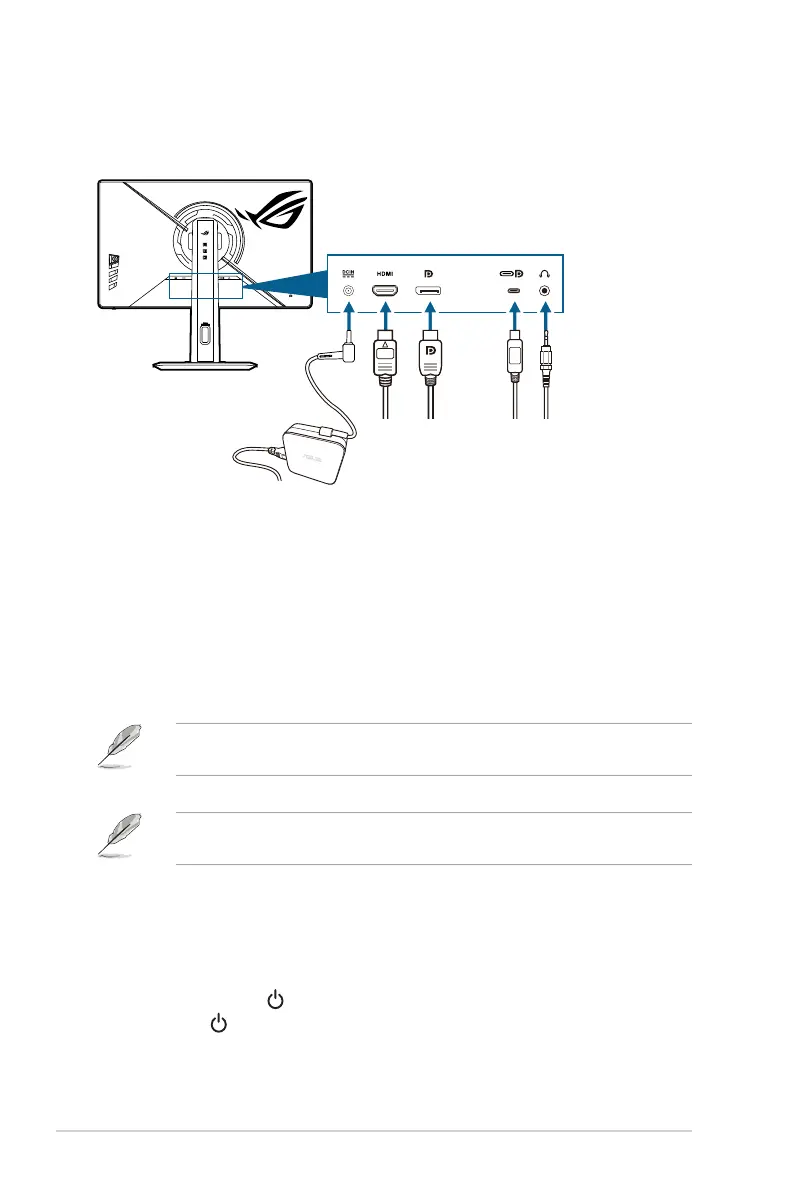
Connect the cables as the following instructions:
• To connect the power cord:
a. Connect the power adapter securely to the monitor’s DC input.
b. Connect one end of the power cord to the power adapter and the other
end to a power outlet.
• To connect the HDMI/DisplayPort/USB Type-C cable:
a. Plug one end of the HDMI/DisplayPort/USB Type-C cable to the
monitor’s HDMI/DisplayPort/USB Type-C jack.
b. Connect the other end of the HDMI/DisplayPort/USB Type-C cable to
your device’s HDMI/DisplayPort/USB Type-C jack.
When these cables are connected, you can choose the desired signal from the
Input Select item in the OSD menu.
If you need to replace the power cord or the connection cable(s), please contact
ASUS customer service.
• To use the earphone: connect the audio cable to the monitor’s earphone jack.
2.6 Turning on the monitor
Press the power button . See page 1-3 for the location of the power button. The
power indicator lights up in white to show that the monitor is ON.




 To Next Page