3-2
Chapter 3: General Instructions
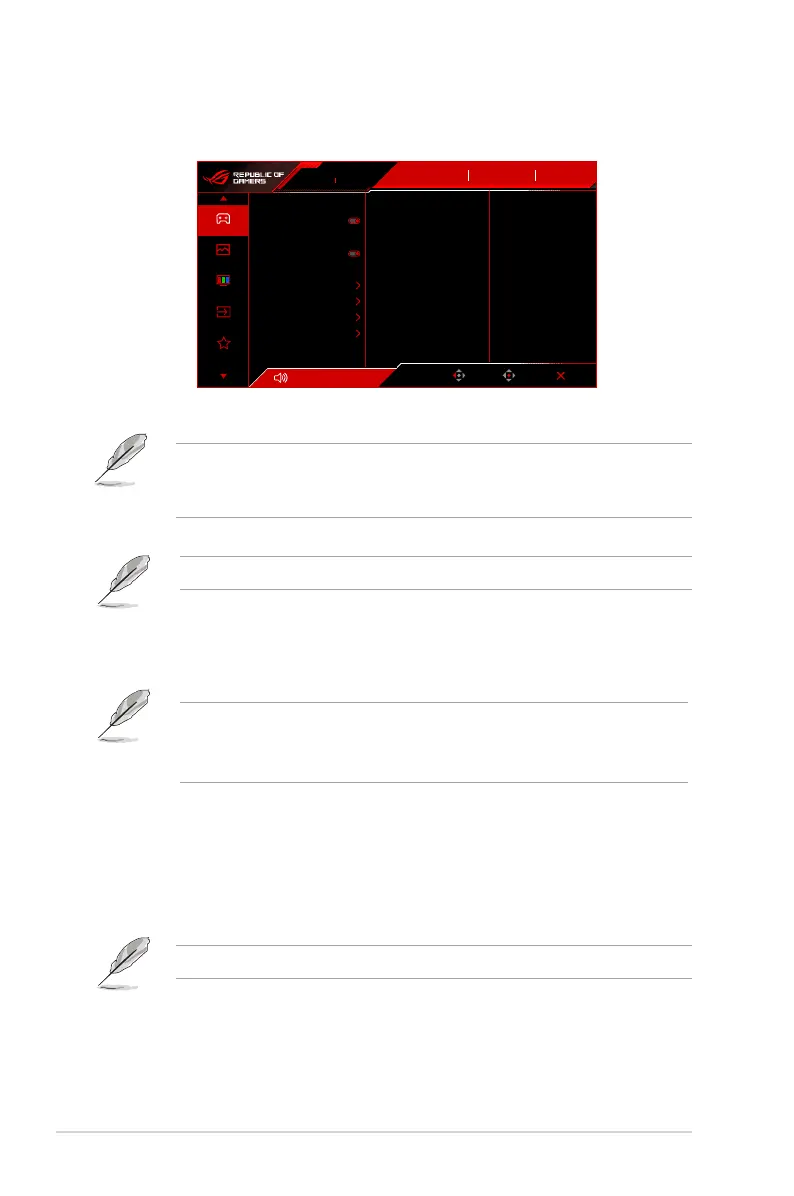
3.1.2 OSD function introduction
1. Gaming
Volume 50
Back
Enter Exit
DisplayPort
Input Select
Gaming
Image
Color
Input Select
MyFavorite
OFF
GameVisual
Racing Mode
HDR
310Hz
1920x1080
ROG STRIX XG259CMS
Overclocking
Variable OD
Variable Refresh Rate
ELMB Setup
GamePlus
GameVisual
Shadow Boost
ASUS DisplayWidget Center
10
• Overclocking: The monitor can overclock to a maximum refresh rate of 310Hz
(only for DisplayPort/USB-C input).
Overclocking may cause screen ickering. To reduce such effects, disconnect
the DisplayPort cable and use the monitor OSD menu to try again with a safer
Max. Refresh rate.
• Variable OD: Improves the gray level response time of the LCD panel.
This function is not available when ELMB SYNC is enabled.
• Variable Refresh Rate: Allows an Variable Refresh Rate supported* graphics
source to dynamically adjust display refresh rate based on typical content frame
rates for power efficient, virtually stutter free and low-latency display update.
• *Variable Refresh Rate can only be activated within 48Hz~310Hz.
• *For supported GPUs, minimum PC system and driver requirements,
please contact the GPU manufactures.
• ELMB Setup:
* ELMB: ELMB can only be activated when Variable Refresh Rate is
Off and the refresh rate is 100Hz, 120Hz, 240Hz, 300Hz or 310Hz. This
function eliminates screen tearing, reduces ghosting and motion blur
when playing games. The function includes 5-level clarity and position
adjustment.
To activate ELMB, turn off Variable Refresh Rate function rst.
* ELMB SYNC: Allows you to turn on the function when Variable Refresh
Rate is On. This function eliminates screen tearing, reduces ghosting and
motion blur when playing games.




 To Next Page