3-4
Chapter 3: General Instructions
• ASUS DisplayWidget Center: Displays a QR code for you to access the
information about ASUS DisplayWidget Center.
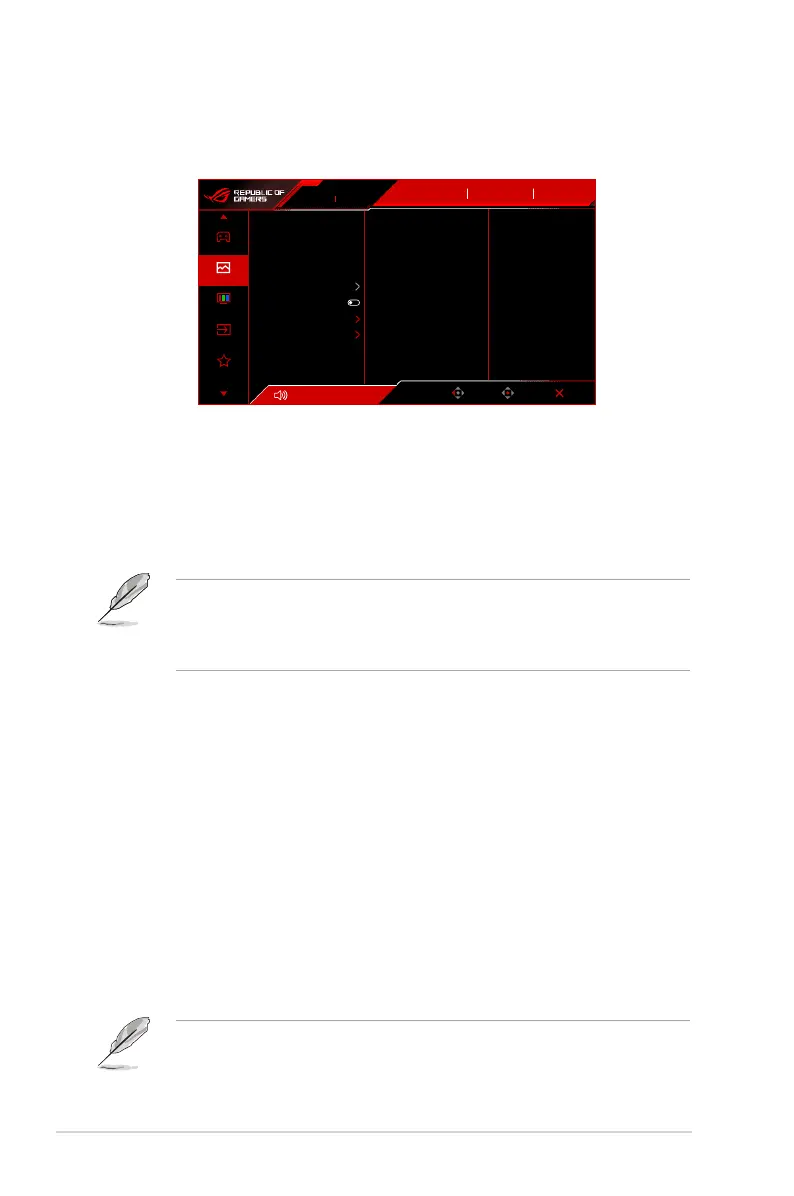
2. Image
Volume 50
Back
Enter Exit
310Hz
1920x1080
ROG STRIX XG259CMS
Input Select
DisplayPort OFF
GameVisual
Racing Mode
HDR
Brightness
Contrast
VividPixel
HDR Setting
ASCR
Aspect Control
Blue Light Filter
15
80
50
Gaming
Image
Color
Input Select
MyFavorite
• Brightness: The adjusting range is from 0 to 100.
• Contrast: The adjusting range is from 0 to 100.
• VividPixel: This function enhances the outline of the displayed picture and
generates high-quality images on screen.
• HDR Setting: Contains 3 HDR modes, including Gaming HDR, Cinema HDR
and Console HDR. The HDR brightness can be adjusted when the Brightness
Adjustable function is enabled.
When displaying HDR content, the following function(s) are not available:
ELMB Setup, GameVisual, Shadow Boost, Contrast, ASCR, Blue Light
Filter, Display Color Space, Color Temp., Saturation, Six-axis Saturation,
Gamma, Power Saving Mode, DisplayPort 1.2.
• ASCR: Turns on/off the ASCR (ASUS Smart Contrast Ratio) function.
• Aspect Control: Adjust the aspect ratio to 16:9 or Square to enjoy different
gaming scenario.
* 16:9: Simply choose Fill Up under Full for better FPS gaming size; or you
can choose Pixel by pixel under Windows Display setting.
* Square: Provides multiple square aspect ratio choices with different
screen sizes, including Full, Equivalent and Pixel by Pixel.
• Blue Light Filter:
• OFF: No change.
• Level 1~4: The higher the level, the less blue light is scattered. When
Blue Light Filter is activated, the default settings of Racing Mode will be
automatically imported. Between Level 1 to Level 3, the Brightness function
is user-configurable. Level 4 is an optimized setting. It is in compliance
with TUV Low Blue Light Certification. The Brightness function is not user-
configurable.
•
Please refer to the following to alleviate eye strains:




 To Next Page