100
6 Troubleshooting
This chapter provides solutions for issues you may encounter with
your router. If you encounter problems that are not mentioned in
this chapter, visit the ASUS support site at:
http://support.asus.com/ for more product information and
contact details of ASUS Technical Support.
6.1 Basic Troubleshooting
If you are having problems with your router, try these basic steps
in this section before looking for further solutions.
Upgrade Firmware to the latest version.
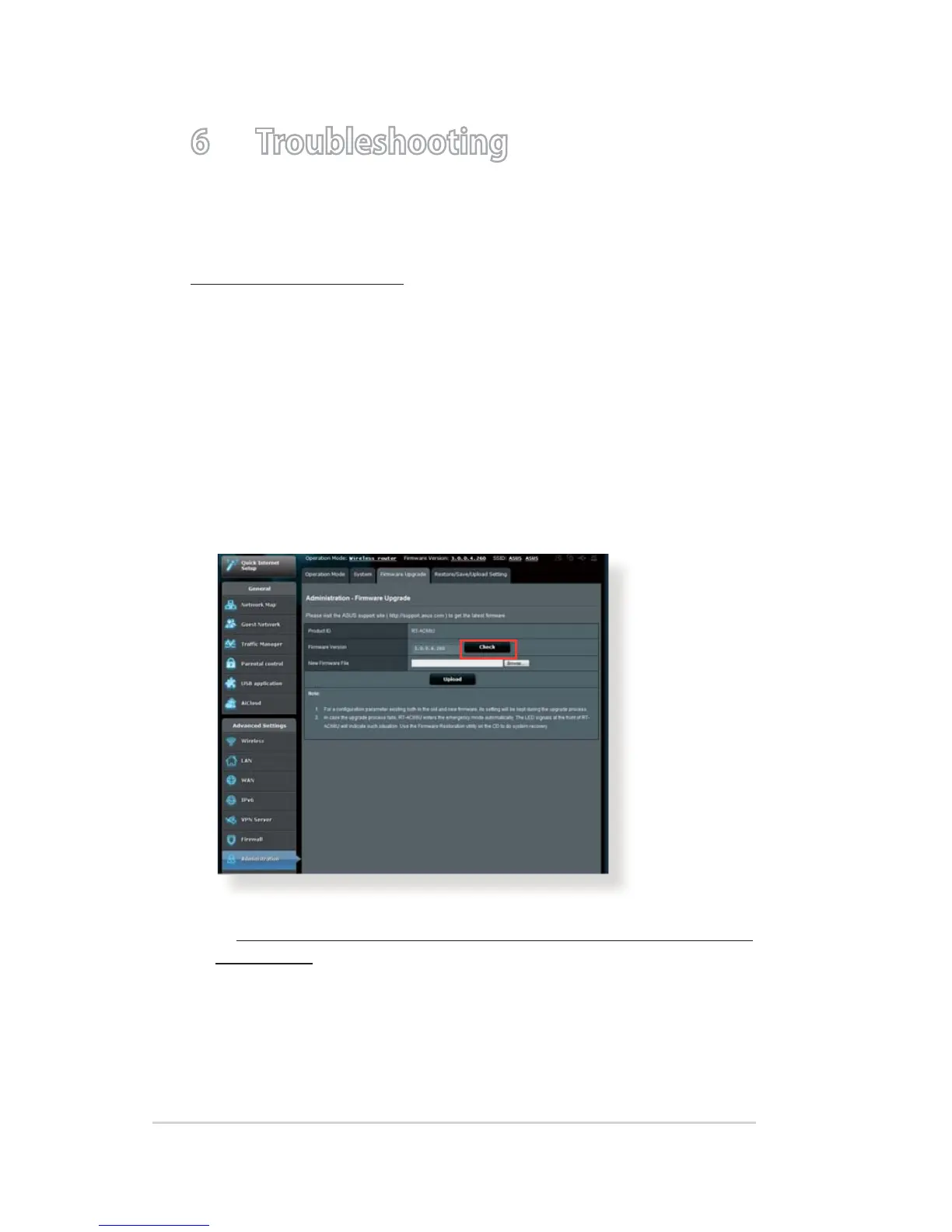
1. Launch the Web GUI. Go to Advanced Settings >
Administration > Firmware Upgrade tab. Click Check to
verify if the latest rmware is available.
2. If the latest rmware is available, visit the ASUS global website
at http://www.asus.com/Networks/Wireless_Routers/RTAC52U/
#download to download the latest rmware.
3. From the Firmware Upgrade page, click Browse to locate the
rmware le.
4. Click Upload to upgrade the rmware.


 To Next Page